 NEWS
NEWS
Apple Rumored to be Using Arizona Proving Grounds to Test Self-Driving Cars
 11/29/2017
 3550
3550
Apple may be leasing former Fiat Chrysler proving grounds in Surprise, Ariz. to test its self-driving car platform in a range of different conditions, according to a report.
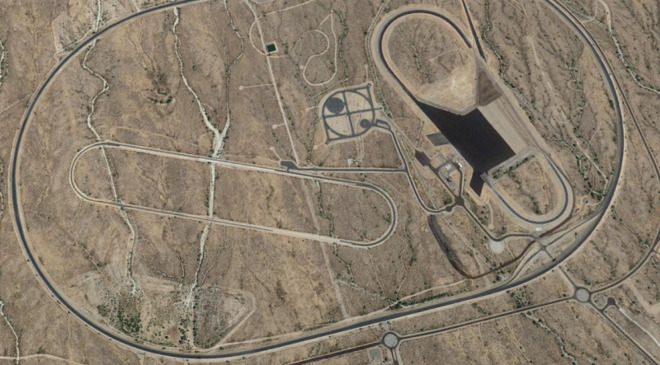
The company has been recruiting test engineers and technicians from various other proving grounds in the state, and indiciated that its goal is testing self-driving systems, Jalopnik said on Tuesday, citing a source "familiar with the matter."
The Chrysler grounds were sold to a housing developer in 2005, and later annexed by the City of Surprise, but went untouched for years. In Sept. 2016 the city signed a development agreement with the site's owner, SFI Grand Vista LLC, which said it intended to lease the grounds to a firm called Route 14 Investment Partners LLC.
Route 14 was given the green light for "all prior and current experimental and proving ground uses," Jalopnik noted, and turns out to have been incorporated in Delaware in 2015, registered under the Corporation Trust Company. Apple has a dropbox at the CTC's main office.
The grounds are said to provide a variety of driving conditions, such as a speed oval and different grades and surfaces, including places where wet weather could be simulated. Some parts simulate crosswalks and intersections —essential in preparing for real-world driving.
Apple has been engaged in limited road tests of modified Lexus SUVs in California. The Arizona facility may be offering a chance to test technology both in controlled conditions and away from the public eye.
The company is believed to have abandoned efforts at designing its own car, but may aiming at a platform for the ridehailing market. Before then it's expected to launch a "PAIL" (Palo Alto to Infinite Loop) shuttle for its workforce.
Source: appleinsider










