NEWS

Arizona Man Gets a Large T-Mobile Tattoo for a Free iPhone 8

10/12/2017

3422

Arizona Man Gets a Large T-Mobile Tattoo for a Free iPhone 8


There’s a story behind every tattoo, but there may be only one where the story includes a free iPhone.


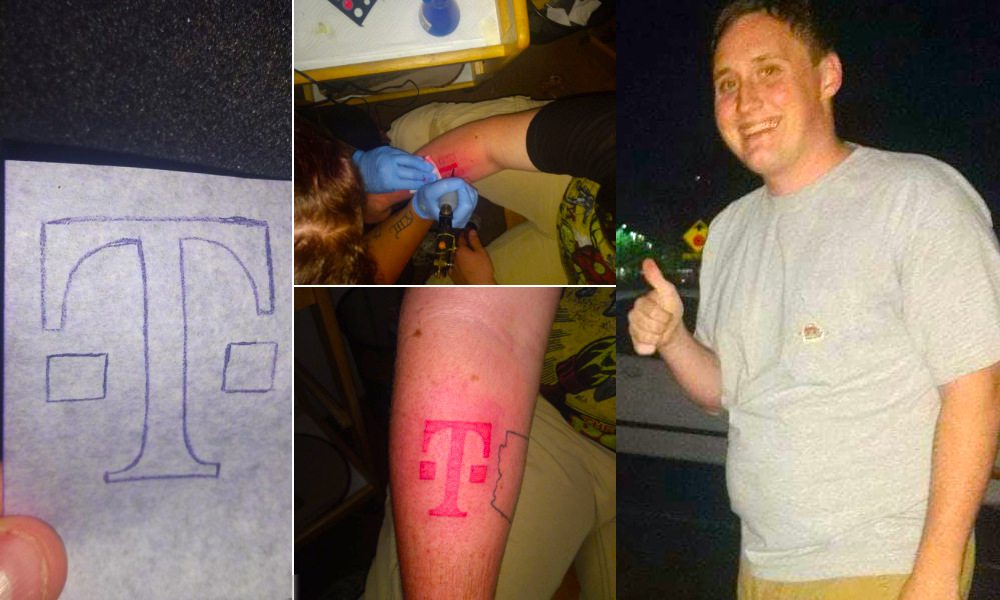
Philip Harrison of Phoenix, Arizona called out to T-Mobile CEO John Legere on Twitter, saying he’d get the cellphone carrier’s logo tattooed on his arm if the company sends him a free iPhone 8.


Legere took the deal, Harrison followed through and earlier this week, Legere promised on Twitterto send him a new iPhone 8.


“My girl told me to get it (on the upper bicep) so then you’ll be able to hide it and I was like, that’s not where everyone can see it,” Harrison told CBS 5 in Phoenix. “I know it might sound crazy, but I was like, I got to stick to my word.”


Instead, Harrison had the tattoo artist ink the magenta logo on his right forearm.


After seeing a tweet, #TattooForPhillip, with a photo of the fresh tattoo, Legere responded: “Who. Nice tattoo!! Let’s get you that iPhone!!”


On Tuesday, Legere tweeted: “Still can’t believe you did it. Love that you’ll have T-Mobile w/you forever!”


Source: cult of mac

Windows
Mac OS
iOS
Linux
3uTools
Win 64-bit For this device
V9.0 2025-11-11
Download
Win 32-bit For this device
V9.0 2025-11-11
Download
3uTools
Intel Chip How to Identify Chip Type
V9.0 2025-12-02
Download
Apple Chip
V9.0 2025-12-02
Download
How to Identify Chip Type
1.  Click the Apple icon in the top-left corner of the screen and select About This Mac.
2.  Check the Processor or Chip field to determine if it is "Intel" or "Apple".
Please use the 3uTools PC client to install the iOS client:
1、 Install either the Windows or Mac version of 3uTools on your computer
2、 Open the PC client and connect your device to the computer via USB cable
3、 After the connection is successful, wait for the computer to automatically install the mobile app for the device, or locate “Install Mobile App” on the computer and manually click to install.
3uTools
deb file
V3.01 2025-11-20
Download
rpm file
V3.01 2025-11-20
Download
Windows
Windows
iOS
iOS
Android
Android
TV
TV
3uAirPlayer
Win 64-bit For this device
V6.0.2 2025-11-19
Download
Win 32-bit For this device
V6.0.2 2025-11-19
Download
iOS Device Mirroring (No App Required)
1、 Install 3uAirPlayer on the Windows PC
2、 Open Control Center and select Screen Mirroring
3、 From the list, choose your PC to start mirroring
4、 Or connect your iOS device to the PC via USB to begin mirroring
Scan to get "3uAirPlayer" App
3uAirPlayer TV V1.0.18
2025-11-28
TV System Requirements: Android 7.0 or later
Download the TV installation package, copy it to a USB drive, insert it into your TV or set-top box, then select the file from the home screen to install.