
NEWS

Taiwan Senior to Play Pokemon Go on Bike by Multiple iPhones and Android devices

11/15/2018

3012

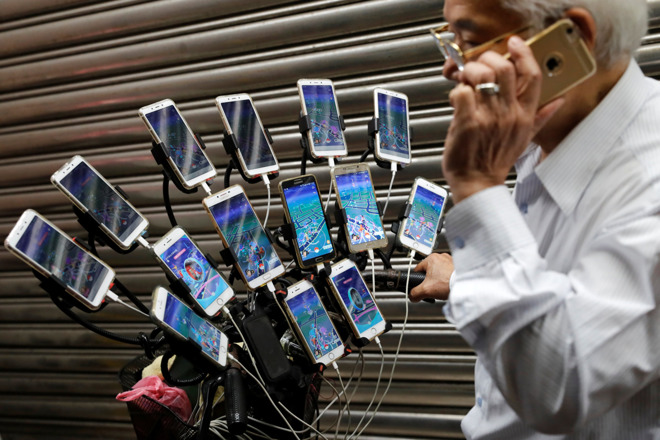
A 70-year-old man from Taipei, Taiwan has become famous for riding a bicycle equipped with 15 smartphones, all used for playing Niantic's Pokemon Go.


Taiwan Senior to Play Pokemon Go on Bike by Multiple iPhones and Android devices


While many of Chen San-yuan's Pokemon-dedicated phones are Samsung models, five of them are iPhones, as is a separate phone he uses for actual calls. The gaming phones are mounted on the bicycle's handlebars, and connected to custom battery packs that can keep the phones going all night, The Japan Times said. Some of his trips around Taipei can last six to seven hours.


"I used one cell phone and then kept playing and playing," Chen explained. "After a month, it became three cellphones, six cellphones, nine cellphones, 12 and then 15." His current rig cost over $4,800, not including the roughly $300 per month he spends on in-game currency.

Taiwan Senior to Play Pokemon Go on Bike by Multiple iPhones and Android devices


The reason for using so many phones is so that he can achieve higher levels faster, and capture rarer creatures. Pokemon Go transposes some of the gameplay of the console Pokemon titles to the real world, requiring people to actually walk or ride around not just for captures but to stock up on items.


The game was a runaway hit when it first launched in 2016, becoming a media sensation with scenes of dozens of players flocking around real-world places. This initial popularity has waned, but the game is still 41st on the App Store's free downloads chart, beating out the likes of Hulu, Venmo, Yelp, SoundCloud, and PayPal.


Source: appleinsider

Windows
Mac OS
iOS
Linux
3uTools
Win 64-bit For this device
V9.0 2025-11-11
Download
Win 32-bit For this device
V9.0 2025-11-11
Download
3uTools
Intel Chip How to Identify Chip Type
V9.0 2025-12-02
Download
Apple Chip
V9.0 2025-12-02
Download
How to Identify Chip Type
1.  Click the Apple icon in the top-left corner of the screen and select About This Mac.
2.  Check the Processor or Chip field to determine if it is "Intel" or "Apple".
Please use the 3uTools PC client to install the iOS client:
1、 Install either the Windows or Mac version of 3uTools on your computer
2、 Open the PC client and connect your device to the computer via USB cable
3、 After the connection is successful, wait for the computer to automatically install the mobile app for the device, or locate “Install Mobile App” on the computer and manually click to install.
3uTools
deb file
V3.01 2025-11-20
Download
rpm file
V3.01 2025-11-20
Download
Windows
Windows
iOS
iOS
Android
Android
TV
TV
3uAirPlayer
Win 64-bit For this device
V6.0.2 2025-11-19
Download
Win 32-bit For this device
V6.0.2 2025-11-19
Download
iOS Device Mirroring (No App Required)
1、 Install 3uAirPlayer on the Windows PC
2、 Open Control Center and select Screen Mirroring
3、 From the list, choose your PC to start mirroring
4、 Or connect your iOS device to the PC via USB to begin mirroring
Scan to get "3uAirPlayer" App
3uAirPlayer TV V1.0.18
2025-11-28
TV System Requirements: Android 7.0 or later
Download the TV installation package, copy it to a USB drive, insert it into your TV or set-top box, then select the file from the home screen to install.




