
NEWS

Pokémon GO Apple Watch Support "Coming Soon"

12/20/2016

3843

A major Pokémon GO update might have brought new critters to the mix recently, but the feature you’re really waiting for, Apple Watch support, is still missing.


Despite developer Niantic having announced back in September that it was working on putting its Pokémon-catching, egg-hatching ways on your wrist, Apple Watch support has still yet to materialise.


Now, with reports circulating that an Apple Watch-friendly addition of the globally dominant app have been knocked on the head, Niantic has reassured us that smartwatch support is still coming, and soon.


“Pokémon Go for Apple Watch is coming soon. Stay tuned,” the company announced in an official Tweet.
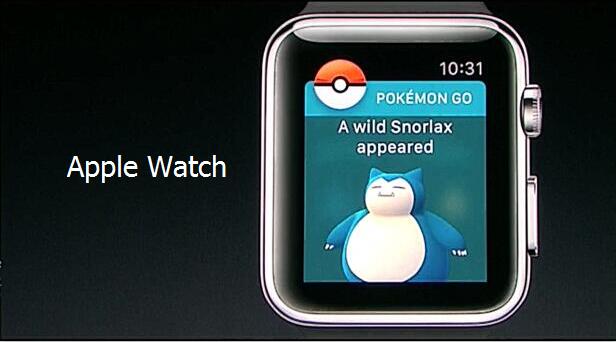

Pokémon GO Apple Watch Support


Originally confirmed during Apple’s iPhone 7 launch event in September, Niantic CEO, John Hanke, promised the update would be introduced before the end of the year.


With the remains of 2016 dwindling, that would put the launch within the next two weeks.


Although the finer points have yet to be revealed, the demoed Apple Watch support showed the wearable alerting your to nearby Pokémon on your wrist, meaning your phone can spend more time in your pocket.


Despite Apple Watch friendly features expected to drop before the end of the year, Android Wear owners will have to wait well into 2017 before their smart wear starts playing nice with Pokémon GO.


Source: trustedreview



Windows
Mac OS
iOS
Linux
3uTools
Win 64-bit For this device
V9.0 2025-11-11
Download
Win 32-bit For this device
V9.0 2025-11-11
Download
3uTools
Intel Chip How to Identify Chip Type
V9.0 2025-12-02
Download
Apple Chip
V9.0 2025-12-02
Download
How to Identify Chip Type
1.  Click the Apple icon in the top-left corner of the screen and select About This Mac.
2.  Check the Processor or Chip field to determine if it is "Intel" or "Apple".
Please use the 3uTools PC client to install the iOS client:
1、 Install either the Windows or Mac version of 3uTools on your computer
2、 Open the PC client and connect your device to the computer via USB cable
3、 After the connection is successful, wait for the computer to automatically install the mobile app for the device, or locate “Install Mobile App” on the computer and manually click to install.
3uTools
deb file
V3.01 2025-11-20
Download
rpm file
V3.01 2025-11-20
Download
Windows
Windows
iOS
iOS
Android
Android
TV
TV
3uAirPlayer
Win 64-bit For this device
V6.0.2 2025-11-19
Download
Win 32-bit For this device
V6.0.2 2025-11-19
Download
iOS Device Mirroring (No App Required)
1、 Install 3uAirPlayer on the Windows PC
2、 Open Control Center and select Screen Mirroring
3、 From the list, choose your PC to start mirroring
4、 Or connect your iOS device to the PC via USB to begin mirroring
Scan to get "3uAirPlayer" App
3uAirPlayer TV V1.0.18
2025-11-28
TV System Requirements: Android 7.0 or later
Download the TV installation package, copy it to a USB drive, insert it into your TV or set-top box, then select the file from the home screen to install.




