
NEWS

Apple Provides New Resources on iOS Design Language

01/20/2017

3757

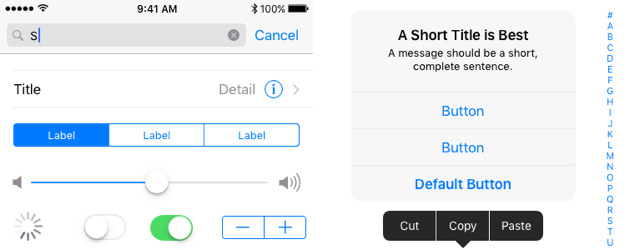
Apple on Thursday updated the iOS Human Interface Guidelines on its Developer site to include downloadable graphical templates that help app producers understand and create software using the iOS design language. 


The new UI design resources are meant to help speed up the app creation and design process while also maintaining the look and feel typical of iOS apps. According to Apple, the resources are "comprehensive and accurately depict the full range of UIKit controls, views, and glyphs available to developers using the iOS SDK."

Apple Provides New Resources on  iOS Design Language


The resources include icon and glyph production files preconfigured to "automate asset production" using Sketch slices or Adobe Generator for Photoshop CC. Two downloads are available for Photoshop and Sketch, weighing in at 133.3 megabytes and 7.1 megabytes respectively. 


Within the package is an installer for the San Francisco font used throughout iOS and other Apple platforms, color swatch files, and guides for dynamic type and text styles. Templates include app screens with standard navigation controls, an iMessage template for designing sticker packs, app and iMessage icons, and glyphs for menus. A collection of UI elements are intended for use with the app templates and can be used to quickly create an app's screen layout. 


Apple has also introduced four videos, providing developers with an overview of what is in the new resources package, as well as three guides covering the usage of icons and glyph templates, and how to create app design composites. 


Source: appleinsider

Windows
Mac OS
iOS
Linux
3uTools
Win 64-bit For this device
V9.0 2025-11-11
Download
Win 32-bit For this device
V9.0 2025-11-11
Download
3uTools
Intel Chip How to Identify Chip Type
V9.0 2025-12-02
Download
Apple Silicon
V9.0 2025-12-02
Download
How to Identify Chip Type
1.  Click the Apple icon in the top-left corner of the screen and select About This Mac.
2.  Check the Processor or Chip field to determine if it is "Intel" or "Apple".
Please use the 3uTools PC client to install the iOS client:
1、 Install either the Windows or Mac version of 3uTools on your computer
2、 Open the PC client and connect your device to the computer via USB cable
3、 After the connection is successful, wait for the computer to automatically install the mobile app for the device, or locate “Install Mobile App” on the computer and manually click to install.
3uTools
deb file
V3.01 2025-11-20
Download
rpm file
V3.01 2025-11-20
Download
Windows
Windows
iOS
iOS
Android
Android
TV
TV
3uAirPlayer
Win 64-bit For this device
V6.0.2 2025-11-19
Download
Win 32-bit For this device
V6.0.2 2025-11-19
Download
iOS Device Mirroring (No App Required)
1、 Install 3uAirPlayer on the Windows PC
2、 Open Control Center and select Screen Mirroring
3、 From the list, choose your PC to start mirroring
4、 Or connect your iOS device to the PC via USB to begin mirroring
Scan to get "3uAirPlayer" App
3uAirPlayer TV V1.0.18
2025-11-28
TV System Requirements: Android 7.0 or later
Download the TV installation package, copy it to a USB drive, insert it into your TV or set-top box, then select the file from the home screen to install.




