
NEWS

iPhone 9 Shells Appear and Some Interesting Names Suggested

08/10/2018

3905

We’ll admit that our working names for the next trio of iPhones have been very scattershot, but we didn’t really have much of an impression as to where Apple would go from the iPhone 8, 8 Plus and X — the latter thought of as a special anniversary moniker.


Well MobileFun out of the UK, which has fielded some interesting 2018 iPhone material recently, now has an idea of what the names will be. And it suggests that the more things change, the more they stay the same.
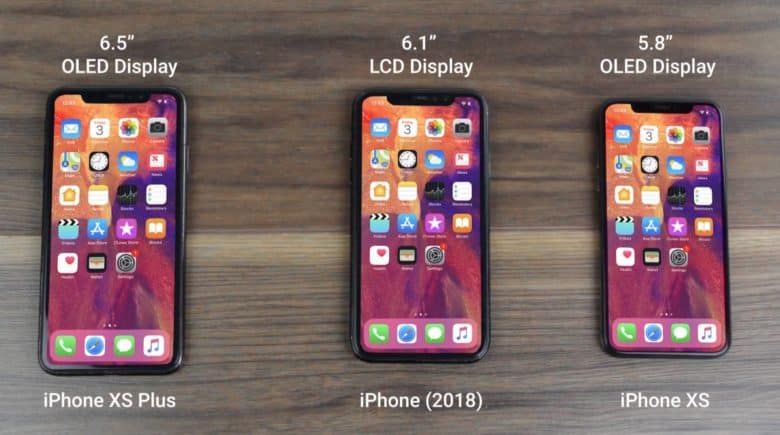

iPhone 9 Shells Appear and Some Interesting Names Suggested

The outlet has received and shown off CNC cases of what the actual iPhones will look like… well, for the most part. The least-expensive model with a 6.1-inch LCD screen and a single camera will be called iPhone (2018). A more expensive 5.8-inch device with an OLED display and two cameras will be called iPhone XS — pronounced Ten-S — and will look pretty much like how the current iPhone X appears. In fact, the caveat in MobileFun‘s video is that it used an iPhone X to represent the iPhone XS. Finally, the priciest model will be the iPhone XS Plus and have a 6.5-inch OLED display and have the same two cameras as the XS.


As the naming convention suggests, it appears that we’ve come to a year of minor iteration, at least on the iPhone X side, in terms of technology. However, the proposition of a much-improved standard iPhone — when viewing the iPhone X as an “improvement” — and the largest display ever coming along as the most premium option may quash the notion of tepidness.


Source: pocketnow

Windows
Mac OS
iOS
Linux
3uTools
Win 64-bit For this device
V9.0 2025-11-11
Download
Win 32-bit For this device
V9.0 2025-11-11
Download
3uTools
Intel Chip How to Identify Chip Type
V9.0 2025-12-02
Download
Apple Chip
V9.0 2025-12-02
Download
How to Identify Chip Type
1.  Click the Apple icon in the top-left corner of the screen and select About This Mac.
2.  Check the Processor or Chip field to determine if it is "Intel" or "Apple".
Please use the 3uTools PC client to install the iOS client:
1、 Install either the Windows or Mac version of 3uTools on your computer
2、 Open the PC client and connect your device to the computer via USB cable
3、 After the connection is successful, wait for the computer to automatically install the mobile app for the device, or locate “Install Mobile App” on the computer and manually click to install.
3uTools
deb file
V3.01 2025-11-20
Download
rpm file
V3.01 2025-11-20
Download
Windows
Windows
iOS
iOS
Android
Android
TV
TV
3uAirPlayer
Win 64-bit For this device
V6.0.2 2025-11-19
Download
Win 32-bit For this device
V6.0.2 2025-11-19
Download
iOS Device Mirroring (No App Required)
1、 Install 3uAirPlayer on the Windows PC
2、 Open Control Center and select Screen Mirroring
3、 From the list, choose your PC to start mirroring
4、 Or connect your iOS device to the PC via USB to begin mirroring
Scan to get "3uAirPlayer" App
3uAirPlayer TV V1.0.18
2025-11-28
TV System Requirements: Android 7.0 or later
Download the TV installation package, copy it to a USB drive, insert it into your TV or set-top box, then select the file from the home screen to install.




