
TUTORIALS

How to Request Your Personal Data From Apple

10/18/2018

5541

After first making the feature available in the European Union to comply with GDPR, Apple users in the US, Canada, and more can now download a copy of their personal information stored by the company. Follow along for how to request your personal data from Apple.

How to Request Your Personal Data From Apple


Apple updated its privacy website today, highlighting new features that arrived with macOS Mojave and iOS 12 like Screen Time and Intelligent Tracking Prevention. Apple also brought its data download tool to eight more countries. Apple also said it will bring the feature to more users around the world in the coming months.


The complete set of self-service data and privacy tools is currently available to customers in the United States, the European Union, Australia, Canada, Iceland, Liechtenstein, New Zealand, Norway, and Switzerland.


Steps: 

Head to Apple’s Data and Privacy log in page

Log in with the Apple ID for which you’d like to download data

How to Request Your Personal Data From Apple


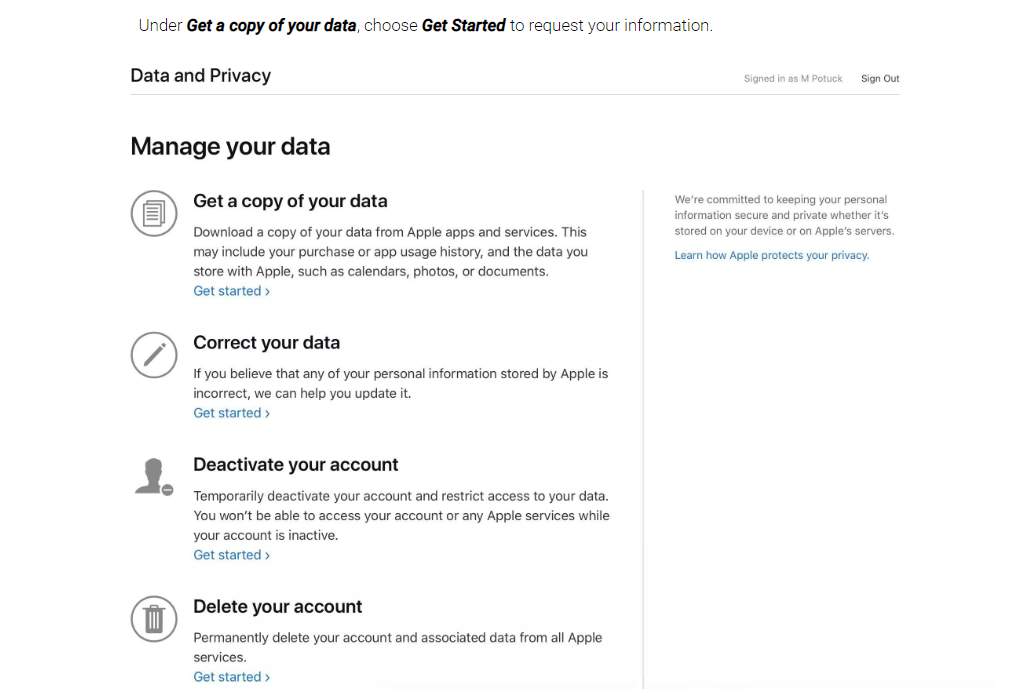
Under Get a copy of your data, click Get Started

Select the data you’d like, and the maximum file size, then click Complete Request


Source: 9to5mac

Windows
Mac OS
iOS
Linux
3uTools
Win 64-bit For this device
V9.0 2025-11-11
Download
Win 32-bit For this device
V9.0 2025-11-11
Download
3uTools
Intel Chip How to Identify Chip Type
V9.0 2025-12-02
Download
Apple Chip
V9.0 2025-12-02
Download
How to Identify Chip Type
1.  Click the Apple icon in the top-left corner of the screen and select About This Mac.
2.  Check the Processor or Chip field to determine if it is "Intel" or "Apple".
Please use the 3uTools PC client to install the iOS client:
1、 Install either the Windows or Mac version of 3uTools on your computer
2、 Open the PC client and connect your device to the computer via USB cable
3、 After the connection is successful, wait for the computer to automatically install the mobile app for the device, or locate “Install Mobile App” on the computer and manually click to install.
3uTools
deb file
V3.01 2025-11-20
Download
rpm file
V3.01 2025-11-20
Download
Windows
Windows
iOS
iOS
Android
Android
TV
TV
3uAirPlayer
Win 64-bit For this device
V6.0.2 2025-11-19
Download
Win 32-bit For this device
V6.0.2 2025-11-19
Download
iOS Device Mirroring (No App Required)
1、 Install 3uAirPlayer on the Windows PC
2、 Open Control Center and select Screen Mirroring
3、 From the list, choose your PC to start mirroring
4、 Or connect your iOS device to the PC via USB to begin mirroring
Scan to get "3uAirPlayer" App
3uAirPlayer TV V1.0.18
2025-11-28
TV System Requirements: Android 7.0 or later
Download the TV installation package, copy it to a USB drive, insert it into your TV or set-top box, then select the file from the home screen to install.




