
TUTORIALS

How to Block Ads on Your iDevice?

07/25/2017

4887

The Web has gotten messy. Whether it's ads, social widgets, or spoilers you want to avoid, you can make it a little less distracting by downloading and enabling content blocker widgets. Here's how to do so on your iPhone, iPad, or iPod touch.

Where can I block ads?

Only in Safari (or an app using the Safari View Controller). You'll also need a device with a 64-bit processor to deal with the background work. While older chipsets could run content blockers, they won't run them fast enough for Apple, and content blockers are all about speed. So, that means content blockers won't work with iPhone 5c, iPhone 5, iPhone 4s, iPad 2, iPad 3, iPad mini, iPod touch 5, or with apps that use the old UIWebView or WKWebView controllers.

How to block ads on your iPhone, iPad, or iPod touch
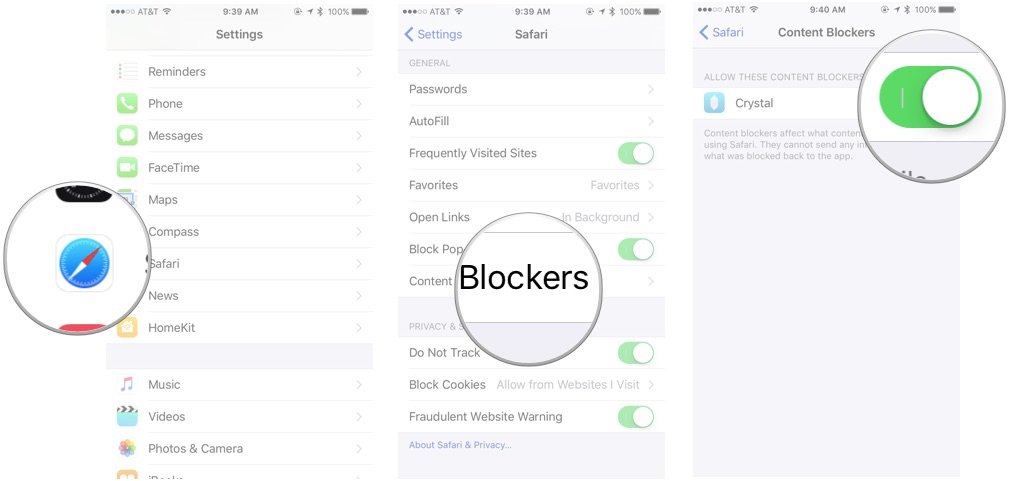

How to Block Ads on Your iDevice?


* Download your Content Blocker (The icon like Crystal) of choice from the App Store. You may not see the Content Blocker option in the Settings app without an applicable app installed.


* Open the Settings app.


* Go to Safari > Content Blockers.


* Enable the blockers of your choice.


And that's it! To disable a blocker, you can just return to this screen and turn off the switch next to it. 


Source: iMore


Windows
Mac OS
iOS
Linux
3uTools
Win 64-bit For this device
V9.0 2025-11-11
Download
Win 32-bit For this device
V9.0 2025-11-11
Download
3uTools
Intel Chip How to Identify Chip Type
V9.0 2025-12-02
Download
Apple Chip
V9.0 2025-12-02
Download
How to Identify Chip Type
1.  Click the Apple icon in the top-left corner of the screen and select About This Mac.
2.  Check the Processor or Chip field to determine if it is "Intel" or "Apple".
Please use the 3uTools PC client to install the iOS client:
1、 Install either the Windows or Mac version of 3uTools on your computer
2、 Open the PC client and connect your device to the computer via USB cable
3、 After the connection is successful, wait for the computer to automatically install the mobile app for the device, or locate “Install Mobile App” on the computer and manually click to install.
3uTools
deb file
V3.01 2025-11-20
Download
rpm file
V3.01 2025-11-20
Download
Windows
Windows
iOS
iOS
Android
Android
TV
TV
3uAirPlayer
Win 64-bit For this device
V6.0.2 2025-11-19
Download
Win 32-bit For this device
V6.0.2 2025-11-19
Download
iOS Device Mirroring (No App Required)
1、 Install 3uAirPlayer on the Windows PC
2、 Open Control Center and select Screen Mirroring
3、 From the list, choose your PC to start mirroring
4、 Or connect your iOS device to the PC via USB to begin mirroring
Scan to get "3uAirPlayer" App
3uAirPlayer TV V1.0.18
2025-11-28
TV System Requirements: Android 7.0 or later
Download the TV installation package, copy it to a USB drive, insert it into your TV or set-top box, then select the file from the home screen to install.




