
TUTORIALS

How to Turn off Siri on Lockscreen in iPhone/iPad on iOS 10?

12/07/2016

5465

Many users know that Siri main function is helping user control their iPhone, so that they can hands-free. However, users will not use it frequently in reality life. Acutally this funtion effect users experience for some of users who seldom use the Siri on Lockscreen. It is not only wasting system resource Siri will also appear on your iPhone although you don't want to use or just touch "Home" button carelessly. Now I will show you how to close Siri on your iPhone "Home"page, and all pictures I have attached are from the "Realtime Screen" function in 3uTools. You also can try it.


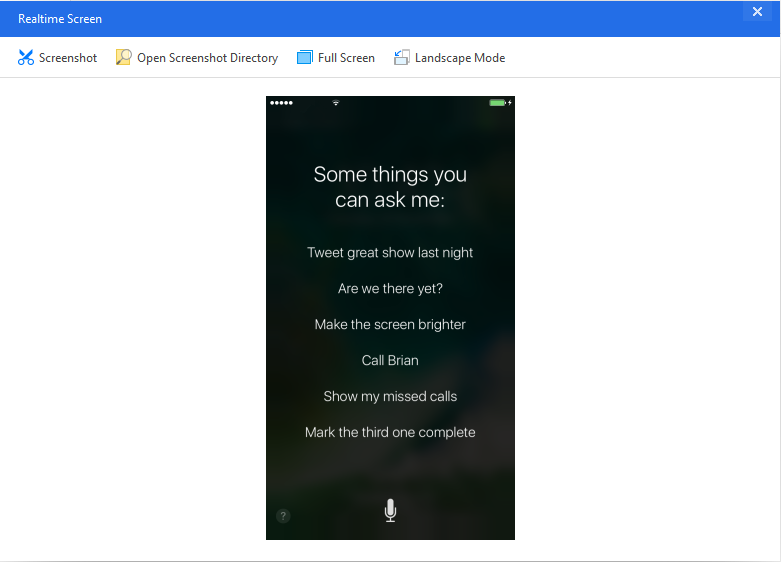
Did you pressed "Home" button carelessly then Siri came out?

How to Turn off Siri on Lockscreen in iPhone/iPad on iOS 10?


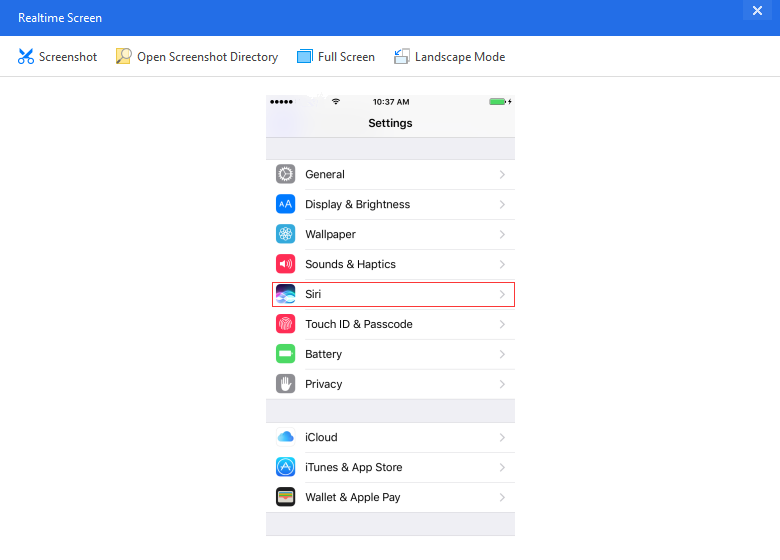
1. First,open"Setting",and find "Siri"

How to Turn off Siri on Lockscreen in iPhone/iPad on iOS 10?


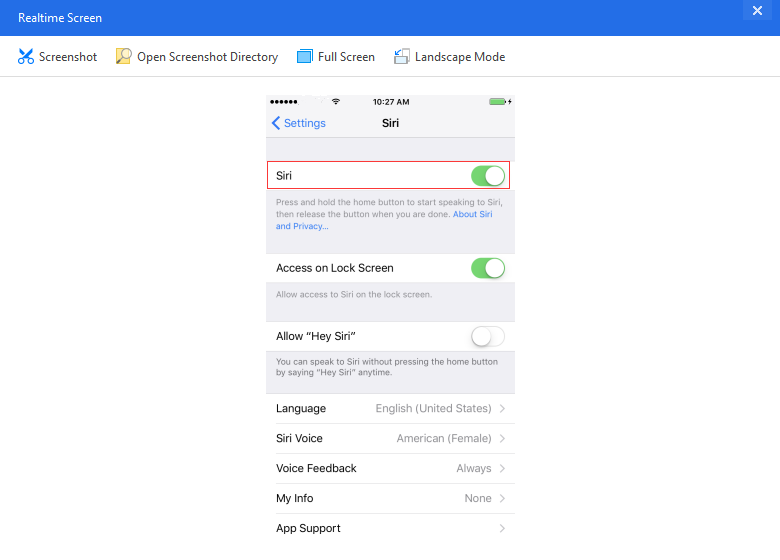
2. Turn on "Siri",yes turn on,then you can see other settings.

How to Turn off Siri on Lockscreen in iPhone/iPad on iOS 10?


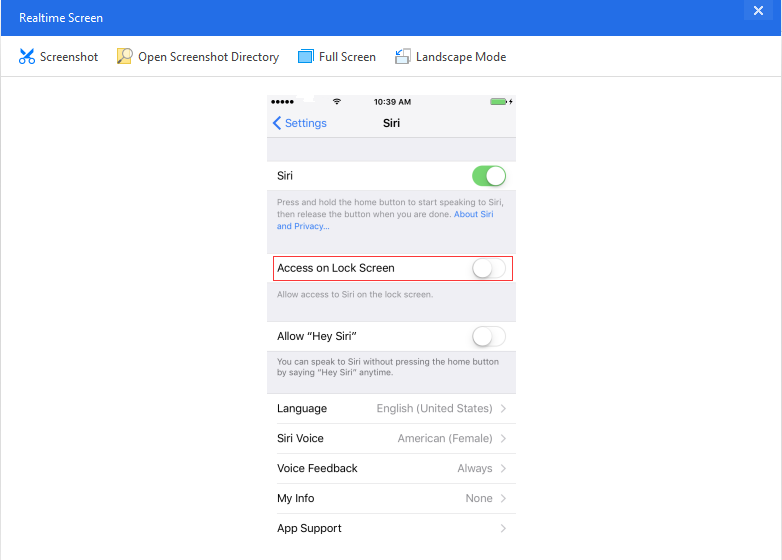
3. Turn off "Access on Lock Screen", and if you want you can change "Language" on this page.

How to Turn off Siri on Lockscreen in iPhone/iPad on iOS 10?


Only 3 steps, it's easy, right?

Windows
Mac OS
iOS
Linux
3uTools
Win 64-bit For this device
V9.0 2025-11-11
Download
Win 32-bit For this device
V9.0 2025-11-11
Download
3uTools
Intel Chip How to Identify Chip Type
V9.0 2025-12-02
Download
Apple Chip
V9.0 2025-12-02
Download
How to Identify Chip Type
1.  Click the Apple icon in the top-left corner of the screen and select About This Mac.
2.  Check the Processor or Chip field to determine if it is "Intel" or "Apple".
Please use the 3uTools PC client to install the iOS client:
1、 Install either the Windows or Mac version of 3uTools on your computer
2、 Open the PC client and connect your device to the computer via USB cable
3、 After the connection is successful, wait for the computer to automatically install the mobile app for the device, or locate “Install Mobile App” on the computer and manually click to install.
3uTools
deb file
V3.01 2025-11-20
Download
rpm file
V3.01 2025-11-20
Download
Windows
Windows
iOS
iOS
Android
Android
TV
TV
3uAirPlayer
Win 64-bit For this device
V6.0.2 2025-11-19
Download
Win 32-bit For this device
V6.0.2 2025-11-19
Download
iOS Device Mirroring (No App Required)
1、 Install 3uAirPlayer on the Windows PC
2、 Open Control Center and select Screen Mirroring
3、 From the list, choose your PC to start mirroring
4、 Or connect your iOS device to the PC via USB to begin mirroring
Scan to get "3uAirPlayer" App
3uAirPlayer TV V1.0.18
2025-11-28
TV System Requirements: Android 7.0 or later
Download the TV installation package, copy it to a USB drive, insert it into your TV or set-top box, then select the file from the home screen to install.




