 NEWS
NEWS
Pedometer++ Developer Shares Data on Apple Watch Adoption Rates Across All Models
 03/15/2018
 2765
2765
David Smith, the developer behind the popular Pedometer++ app for iPhone and Apple Watch, today shared some interesting user data that offers insight into Apple Watch adoption rates, and specifically, how quickly he's seen Apple Watch Series 3 adoption grow.
Smith looked at data collected from August 1, 2017 (a month before the debut of the Apple Watch Series 3) to March 14, 2018. During that time, he's seen rapid growth in the number of active Pedometer++ users who have an Apple Watch Series 3, and a steady decline in users who have an Apple Watch Series 0 or an Apple Watch Series 2, both of which are now discontinued. 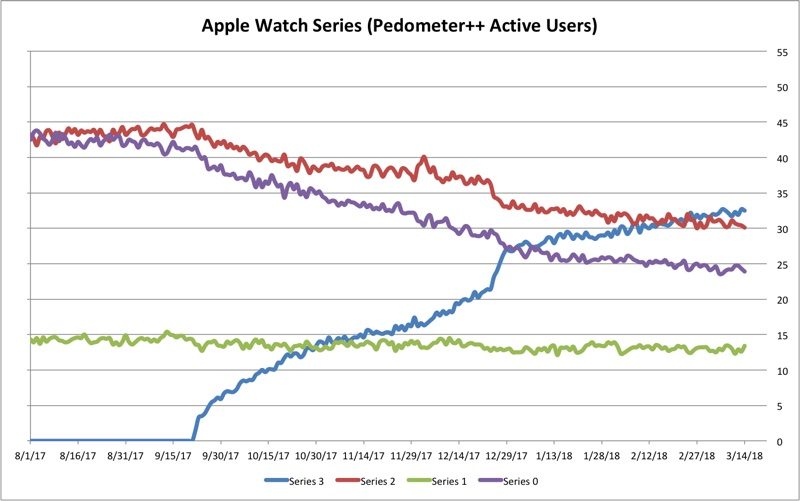
Just under 35 percent of Pedometer++ users now have an Apple Watch Series 3, while around 24 percent have an Apple Watch Series 0, down from more than 40 percent in August of 2017.
According to Smith, he's been keeping a close eye on Apple Watch Series 0 usage rates because he's hoping that Apple will soon drop support for the original Apple Watch, which he describes as a "bit painful" to develop for.
It is just slow and honestly a bit painful to develop for. Even basic things like deploying your application to the watch can take uncomfortably long amounts of time. In daily use the Series 0 is probably "good enough" for many customers, especially with the speed/stability improvements added in watchOS 4, but as a developer I can't wait until I no longer have to support it.
By contrast, Smith says the new Apple Watch Series 3 is "a delight to work with" because it's fast, capable, and has LTE functionality that allows for new kinds applications. Smith is hoping watchOS 5 will drop support for the original Apple Watch, which is why he tracks falling Series 0 usage rates, but he does admit that the device is still adequate for many users who just need basic functionality.
When watchOS 5 launches, presumably this September, the original Apple Watch will be more than three years old, and Smith believes, that based on current trends, Series 0 usage could be as low as 15 to 20 percent in his Pedometer++ app, which presumably is reflective of overall usage rates.
For comparison's sake, Apple ended support for the original iPhone, released in 2007, in 2010 when the fourth-generation version of iOS was released. Support for the first-generation iPod touch, also released in 2007, ended with the same operating system update.
Apple ended support for the first-generation iPad, released in 2010, with the launch of iOS 6 in 2013.
Apple clearly has a history of ending support for first-generation devices after a few years, but it's not yet clear if the company will do the same for the original Apple Watch. Some of the original Apple Watch models, which were offered in 18-Karat gold, were priced at up to $17,000, so Apple could have unhappy customers when support for the device eventually ends.
For more of Smith's Apple Watch adoption analysis, make sure to check out his full blog post.
Source: macrumors










