 NEWS
NEWS
Google Ranks Above Apple In Privacy, Governance & Freedom Of Expression
 03/28/2017
 4618
4618
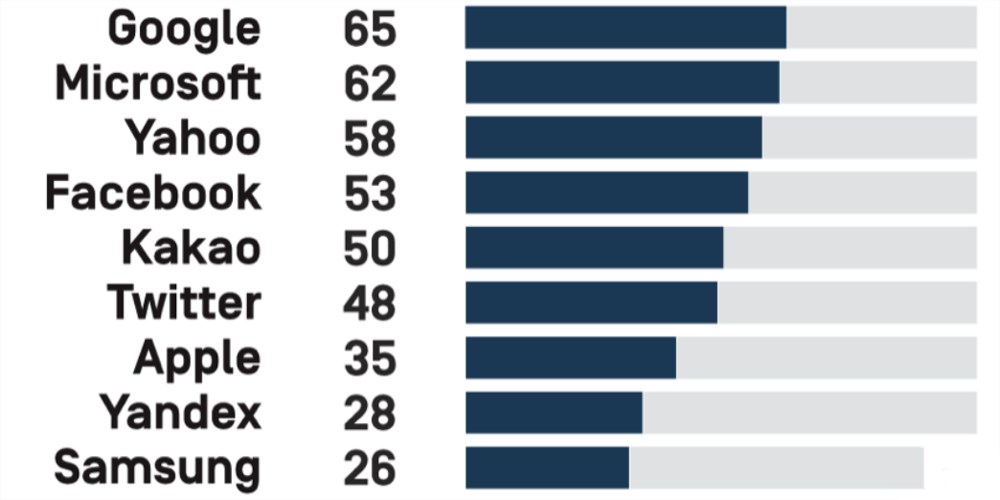
The 2017 Corporate Accountability Index – a company ranking put together by a non-profit chaired by Alphabet’s Eric Schmidt – has ranked Google top dog in the technology sector, while Apple sits at #7 with a little over half Google’s score.
Apple ranked seventh among the 12 internet and mobile companies evaluated, with an overall score of only 35 percent, despite the company’s strong public stand for users’ privacy rights in the face of recent U.S. government demands. A major reason for Apple’s relatively low score was lack of disclosure about commitments and policies affecting freedom of expression. Also, next to its U.S. peers, Apple disclosed little about how or whether it has institutionalized commitments to protect users’ rights.
Google got the top score of 65 in the table put together by Ranking Digital Rights, a program from New America, whose chairman emeritus is executive chairman of Google parent company Alphabet.
The connection between New America and Ranking Digital Rights is not made terribly obvious on the website of either, but is acknowledged by a link on the Funders and Partners page of the latter’s site. The Register first spotted the link when Google came in on top the first year the ranking was announced, in 2015.
Schmidt became executive chairman of the New America Foundation, which had built a strong reputation as a non-partisan and imaginative policy think tank, in 2008. The following year, the foundation created an “Open Technology Initiative” and the think tank began to march in lockstep with Google’s own policy agenda.
This is called “policy laundering” – the act of legitimising a policy, or attempting to seize control of a debate, via third parties. Another useful description is “carousel propaganda”, coined by blogger Frank Fisher, an analogue of “carousel fraud”.
The Register also noted the absurd methodology used to rank companies.
The RDR project did not empirically measure the behaviour of the companies. It merely performed a textual analysis of their mission statements, click-through policies, and public utterances. It examined what they say they do, not what they actually do. But then it didn’t measure it against reality.“We did not fact check their statements,” project head Rebecca McKinnon admitted this week in a video webcast. “What we’re hoping is this create a set of data based on what companies claim they’re doing.”
So it just looks for keywords in documents – keywords that someone involved with the organization might know to use – and then doesn’t even check whether the company lives up to its claims. Nice work by Andrew Orlowski, and a hat-tip to Patently Apple for the pointer.
Source: 9to5mac










