 NEWS
NEWS
Apple updates German and Italian Apple Pay Support Oages Ahead of Rumored Launch
 02/21/2017
 3285
3285
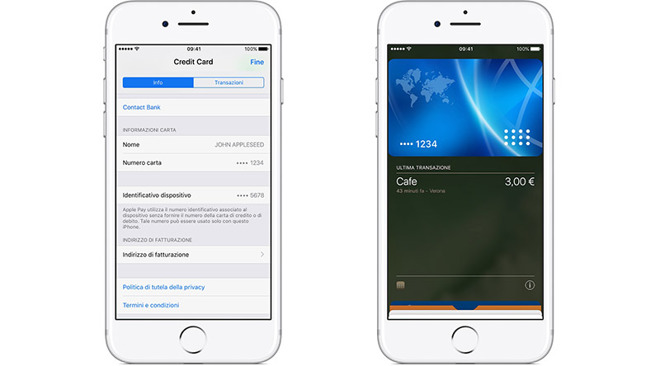
The newly refreshed German and Italian pages, spotted by Polish blog iMagazine, incorporate what appears to be full translations of the "About Apple Pay" document found on Apple's U.S. website.
While the English version was last updated on Feb. 3, the German and Italian webpages were published on Feb. 14.
The support document is basically an informational hub for new Apple Pay users, with instructions on how to set up and use the service, provision cards, reference transactions, return items and more. General information like system security and developer considerations are also provided.
In addition to translated text, Apple inserted region-specific graphics of the Wallet app running on iPhone. As seen above, the Italian version includes an example credit card being added to the app, as well as a "last transaction" pane showing a 3 euro purchase from a cafe in Verona. The German site incorporates similar assets, but with localizations for Frankfurt.
Neither the German nor Italian About Apple Pay sites mention specific banks, and the graphics include generic non-affiliated credit cards. That may soon change, however, as Apple's list of supported European banks was also translated into German and Italian last week.
The "About Apple Pay" updates arrive four months after a "Using Apple Pay" support page was posted on Apple's German site last October.
Apple's latest big Apple Pay release came in December when the service launched in Spain, just over a month after Japan gained access in October. Before that, customers in Singapore and Hong Kong gained access to the payments product last April and July, respectively.
Most recently, international banks ING and Macquarie joined the list of supporting Apple Pay partners in Australia earlier today, as promised last week.
Apple has yet to announce official plans for an Apple Pay rollout in Germany or Italy.
Source: appleinsider










