 TUTORIALS
Solution for Apple Mobile Device Service
 03/13/2026
 1778
1778
Solution for Apple Mobile Device Service Repair Failure:
Step 1: Locate and Install Driver Files
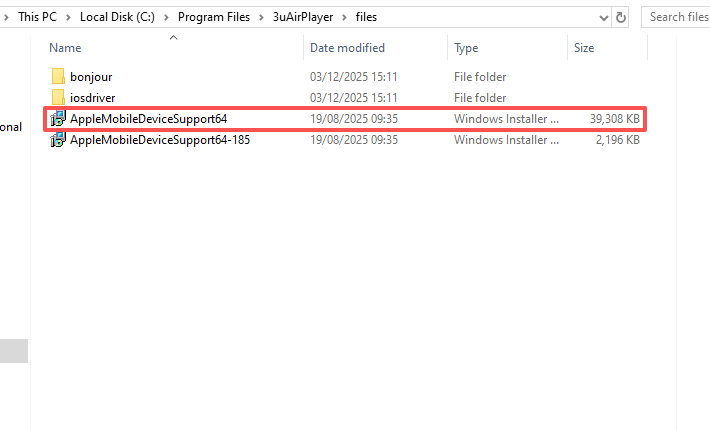
1. Navigate to the files folder within the 3uAirPlayer installation directory (typically C:\Program Files\3uAirPlayer\files).
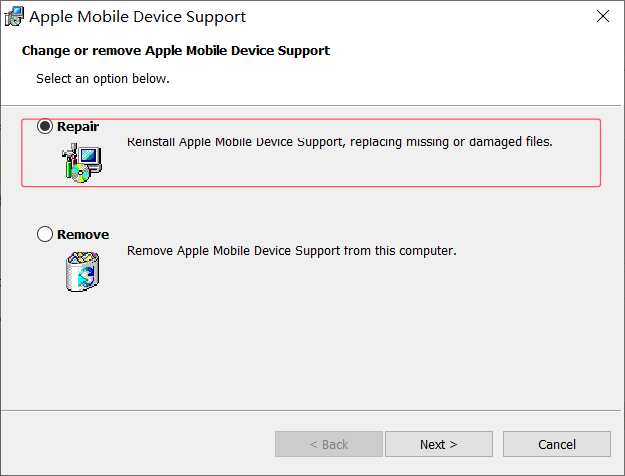
2. Double-click the AppleMobileDeviceSupport64.msi file and follow the prompts to complete installation.
Step 2: Handle Installation Errors
If you encounter an error like **“Service ‘Apple Mobile Device Service’ failed to start”** during installation, perform a deep repair using 3uTools:
1. Open the 3uTools desktop application and click “Toolbox” on the left sidebar.
2. Locate the “Driver Repair” feature, select the “Apple Mobile Device Service Repair” option, and follow the prompts to complete the automatic repair process.
3. After repair completes, restart your computer and attempt device connection again.
Following these steps effectively resolves screen mirroring and connection failures caused by abnormal Apple device driver services.









