 NEWS
NEWS
Apple May Add Screens to MacBook Pro Trackpads and Keyboards
 03/11/2020
 2542
2542
A future Apple MacBook Pro may have Touch Bar-like displays and controls in their trackpads or in the keyboard's space bar, to provide additional surfaces for information to be provided to the user like shortcuts or autocorrect choices.

AppleInsider mockup of a future MacBook Pro trackpad, based on drawings in the patent application
After recent patents hinted that Apple may still be examining touch screens for the MacBook Pro, a new application shows that it also intends to built on its Touch Bar. Future MacBook Pro models may add integrated extra displays into their trackpads and keyboards.
The system would not replace whole of the regular keyboard with a touch-sensitive screen, but rather add displays into into the space bar or the trackpad.
"Auxiliary text display integrated into a keyboard device," US Patent No 10,585,494, shows multiple configurations of how such a keyboard would look, and what functions it would bring.
"[Few] advances have been made in recent years to improve typing efficiency for users operating desktop and laptop computers," says the patent. "Therefore, an improved keyboard design is needed in order to increase efficiency and improve the user experience when typing on desktop and laptop computers."
One part of the patent application describes what appears to be the existing Touch Bar, just concentrating on the displaying of autocorrect or autocomplete-like text. Apple refers to this as being one "example placement of the auxiliary display above a set of keys on the lower portion."
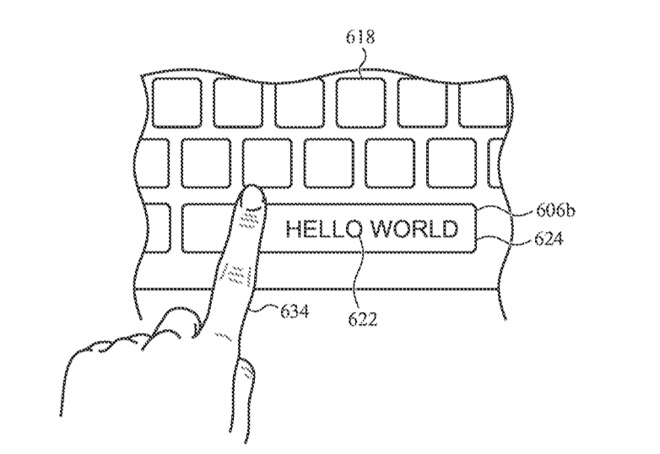
One suggestion is to bring Touch Bar-like autocorrection or autocompletion suggestions into the space bar itself
A similar example shows the space bar displaying autocorrect or autocomplete suggestions.
Throughout the patent application, Apple breaks down a MacBook Pro-like device into an upper portion with the main display, and a lower one with the keyboard plus this "auxiliary display" in the trackpad or space bar.
Apple does seem to rather assume that touch-typing is a thing of the past. "In a typical computer system, when a user is typing on a keyboard," says the patent, "it is difficult for the user to maintain visual focus on both the keys being typed and the main display rendering the typed characters."
The presumption is that users are hunt-and-peck typists, so this "may help improve typing efficiency by allowing the user to focus on the auxiliary display within the keyboard during typing operations."
However, it will always be an auxiliary, or extra, display. "[The] auxiliary display may render a series of characters corresponding to the most recently typed keys," continues the patent, "[but the] same characters may also be rendered on the main display in accordance with a word-processing or text editing application."
The patent proposes that showing the most recently-typed words, and then proposing "suggested words or phrases to complete a word or sentence," will improve typing speed and accuracy.
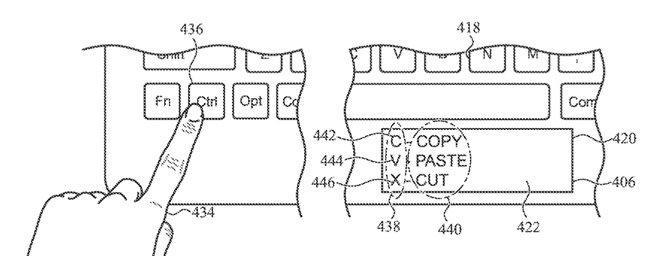
Holding down a key could cause the trackpad to offer keyboard shortcut suggestions. Note how the drawing shows the Windows-like Control key being used instead of Command
Selecting a suggested word or phrase means that the auxiliary display would need to be touch-sensitive. Trackpads are already touch-sensitive, but this patent suggests a Force Touch-like feature where "a user may use a light touch to select a word."
With both the trackpad and a space bar containing an auxiliary display, there is the issue of how the user's own hand position can get in the way.
"Because the auxiliary display is located on the keyboard near the user's hands, the auxiliary display may be adapted to detect when a user's finger or other object visually obstructs a portion of the auxiliary display," continues the patent. "In response to the detection of an obstruction, the auxiliary display may be configured to adapt the arrangement of the information displayed to reduce or avoid the detected obstruction."
As well as autocorrection or autocompletion, the information that could be displayed includes possibly helpful instructions. For instance, holding down the Command key might result in the space bar showing the C, V and X keystrokes for Copy, Paste and Cut.
Curiously, the patent drawing that shows this has the user holding down the Control key rather than Command.
The patent is credited to John A. Porcella and Kyle J. Nekimken, neither of whom appear to have any previous patents.
Source: Appleinsider









