 NEWS
NEWS
Apple is Sending Care Packages to Stranded Employees in China
 03/02/2020
 2700
2700
Apple hasn't forgotten its employees in China isolated because of the coronavirus, and is sending them care packages containing food, medical supplies, and an iPad.
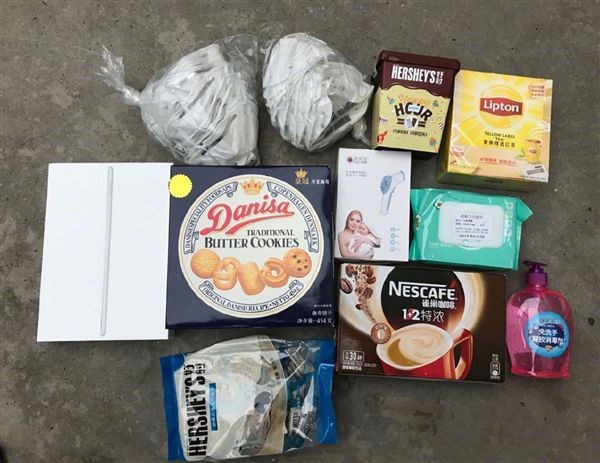
Care packages include snacks, face masks, and an iPad
The care packages contain some snacks, face masks and even a new 10.2-inch iPad. Also enclosed with the items is a letter from Apple, to the employee.
Dear Colleagues in Hubei and Wenzhou,
We hope this note finds you heathy and well. Since the last communication with you, we understand that you are all staying strong in this challenging time. We understand the difficulties you are facing and would like to provide our best support to you and your families. Hubei and the city of Wuhan have been hit hardest by the coronavirus outbreak, which has now claimed 2,835 lives in China.
We are sending our best wishes to you, on behalf of the entire Apple Team, together with another CareKit for you and your families. In the kit, you will find comfort items and an iPad which can be used to facilitate children's online learning or help pass the time during the prolonged stay at home.
A post containing the letter and package contents on Chinese social network Weibo was discovered by MacRumors on Saturday morning.
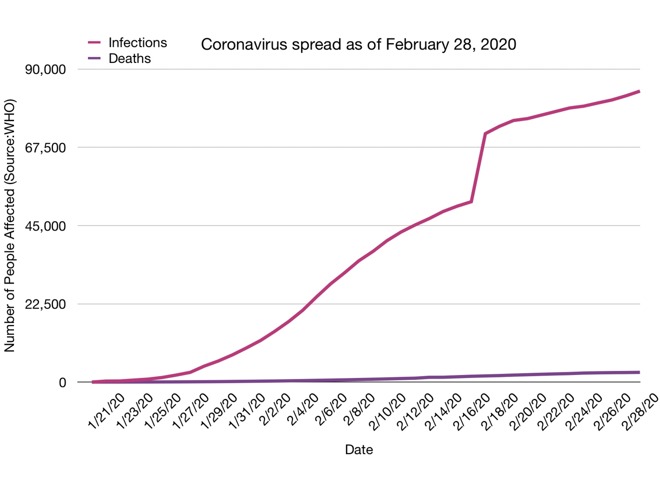
Coronavirus infections vs deaths as of February 28
The 2019 coronavirus continues to sweep the globe. New cases appear everyday throughout the world, and the virus continues to be a severe issue in China. AppleInsider has covered the outbreak and its potential damage to Apple and its supply chain since January. As we near new product announcements and another iPhone product cycle, the lack of fully operational facilities in China may have put Apple behind production schedule.
Apple CEO Tim Cook is optimistic about the state of things, and that China is getting the virus under control.
Source: Appleinsider









