 NEWS
NEWS
Apple Shipped an Estimated 30.7 Million Apple Watches in 2019, Beating Entire Swiss Watch Industry
 02/07/2020
 2556
2556
The Apple Watch outsold the entire Swiss watch industry by a wide margin in 2019, according to new data shared today by Strategy Analytics.
Apple shipped an estimated 30.7 million units worldwide in 2019, up 36 percent from the estimated 22.5 million units shipped in 2018.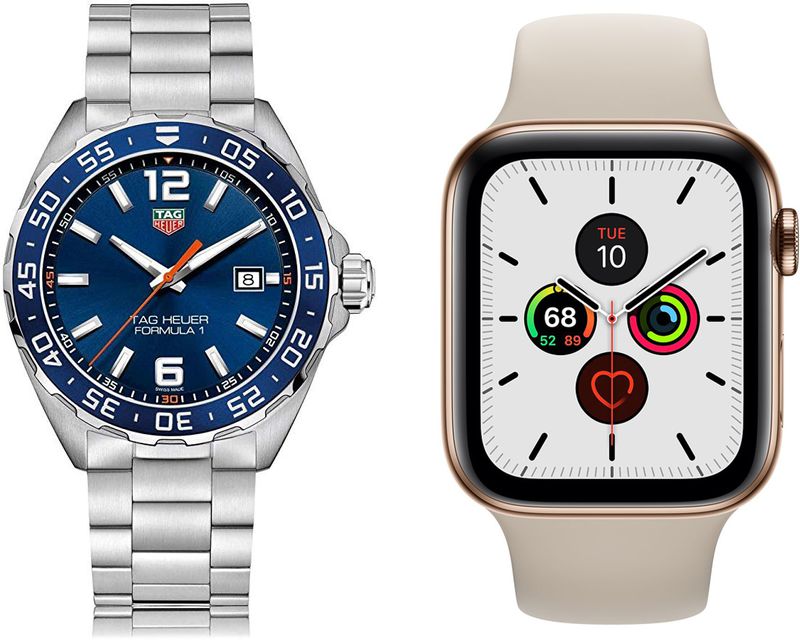
Comparatively, the Swiss watch industry (which includes all Swiss watch brands) is estimated to have shipped a total of 21.1 million units worldwide in 2019, dropping 13 percent from the 24.2 million watches shipped in 2018.
According to Strategy Analytics, the Apple Watch is "wildly popular" in North America, Western Europe, and Asia due to its user-friendly tech, sticky apps, and attractive design. Analog watches, meanwhile, remain popular with older consumers, but young buyers prefer smartwatches and computerized wristwear.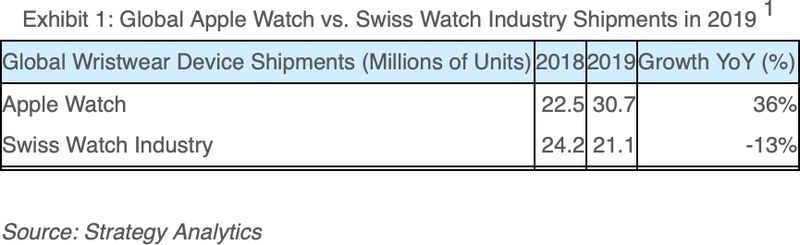
Traditional Swiss watch makers, like Swatch and Tissot, are losing the smartwatch wars. Apple Watch is delivering a better product through deeper retail channels and appealing to younger consumers who increasingly want digital wristwear. The window for Swiss watch brands to make an impact in smartwatches is closing. Time may be running out for Swatch, Tissot, TAG Heuer, and others.
Apple beat Swiss watch shipments with its own Apple Watch shipments during the holiday quarter of 2017, but 2019 marks the first full year where Apple has shipped a larger number of Apple Watches.
Apple does not break out Apple Watch sales numbers so estimates on shipments are based on guesswork, but the large margin between estimated Apple Watch shipments and estimated Swiss watch shipments suggests that the conclusion the Apple Watch outsold Swiss watches in 2019 is accurate.
Source: Macrumors









