
NEWS

Apple Watch Series 5 Gains 1st Super-Useful Function For Its Compass

10/22/2019

2905

When Apple announced its latest smartwatch, the Apple WatchSeries 5, it had several new hardware elements. First, and most eye-catching was a brand new screen with an always-on capability. But there was also a more curious element: a compass.


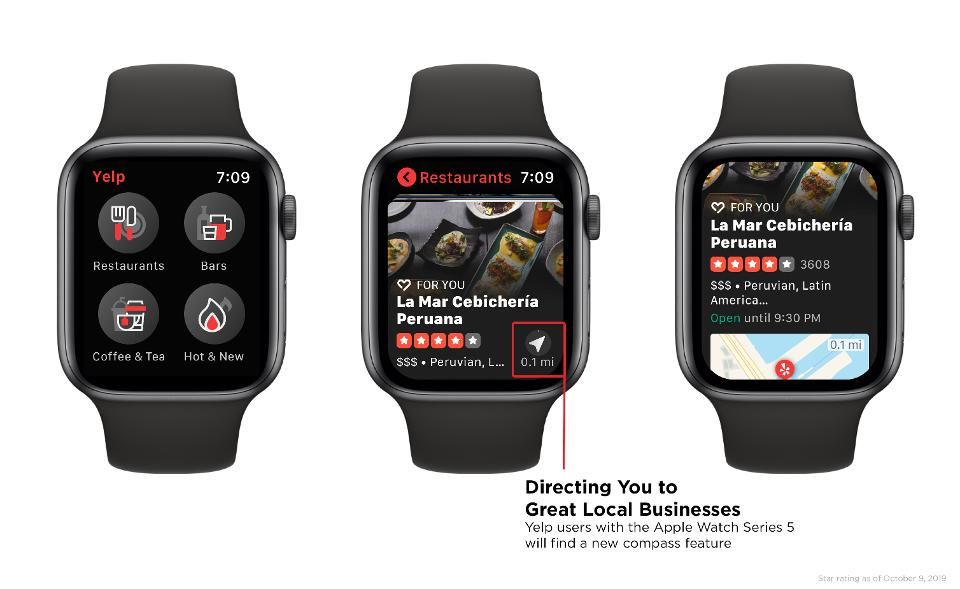
Now, the full purpose of such an extra has been revealed as Yelp has announced how it will implement it.

Apple Watch Series 5 Gains 1st Super-Useful Function For Its Compass


Sure, we already knew it would be helpful to the outward bound looking for guidance as to which way to head in a remote situation. And, actually, even being able to know which way is north can be useful in a bunch of situations. 


Cast your mind back to when the iPhone 3GS succeeded the iPhone 3G. An compass was an addition to that phone’s hardware, too. People were simply mocking of this extra element, saying they’d never use it. 


And then early Augmented Reality apps appeared which used the compass. One of the first of these was Nearest Tube, a frankly brilliant app which guided you around London by floating flags in the air to show which way to go for the most convenient subway station. 


Now, the compass promises to add extra capabilities to Apple Watch apps, and Yelp is the first of these. 


Source: Forbes

Windows
Mac OS
iOS
Linux
3uTools
Win 64-bit For this device
V9.0 2025-11-11
Download
Win 32-bit For this device
V9.0 2025-11-11
Download
3uTools
Intel Chip How to Identify Chip Type
V9.0 2025-12-02
Download
Apple Chip
V9.0 2025-12-02
Download
How to Identify Chip Type
1.  Click the Apple icon in the top-left corner of the screen and select About This Mac.
2.  Check the Processor or Chip field to determine if it is "Intel" or "Apple".
Please use the 3uTools PC client to install the iOS client:
1、 Install either the Windows or Mac version of 3uTools on your computer
2、 Open the PC client and connect your device to the computer via USB cable
3、 After the connection is successful, wait for the computer to automatically install the mobile app for the device, or locate “Install Mobile App” on the computer and manually click to install.
3uTools
deb file
V3.01 2025-11-20
Download
rpm file
V3.01 2025-11-20
Download
Windows
Windows
iOS
iOS
Android
Android
TV
TV
3uAirPlayer
Win 64-bit For this device
V6.0.2 2025-11-19
Download
Win 32-bit For this device
V6.0.2 2025-11-19
Download
iOS Device Mirroring (No App Required)
1、 Install 3uAirPlayer on the Windows PC
2、 Open Control Center and select Screen Mirroring
3、 From the list, choose your PC to start mirroring
4、 Or connect your iOS device to the PC via USB to begin mirroring
Scan to get "3uAirPlayer" App
3uAirPlayer TV V1.0.18
2025-11-28
TV System Requirements: Android 7.0 or later
Download the TV installation package, copy it to a USB drive, insert it into your TV or set-top box, then select the file from the home screen to install.




