 NEWS
NEWS
Apple Watch Series 4 Wins 'Displays of the Year' Award
 05/09/2019
 3072
3072
The Apple Watch Series 4 was named one of the Displays of the Year by The Society for Information Display (SID) during the 2019 Display Industry Awards announced at Display Week, a yearly symposium and trade show.
The Displays of the Year awards highlight "the high-quality innovative work taking place in the display industry at every level." The specific category the watch won focuses on "the most significant technological advances and/or outstanding features."
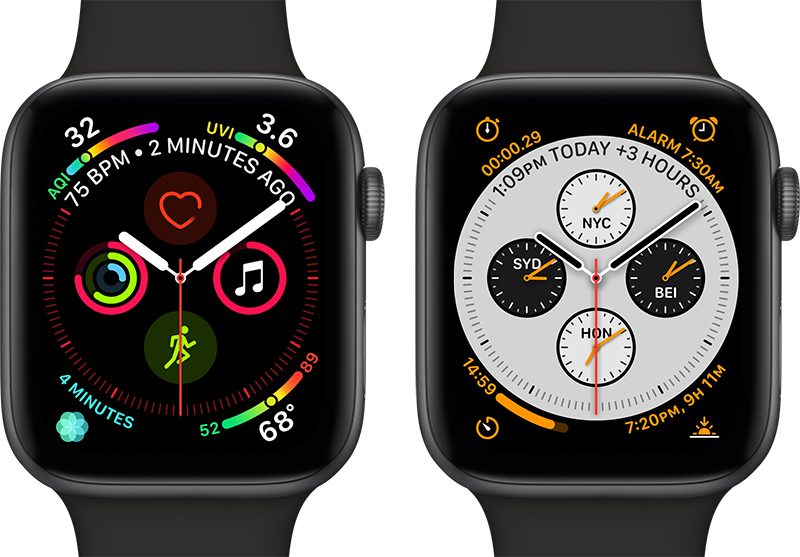
The Apple Watch Series 4 received an award because it features an OLED display that's 30 percent larger than the previous display, without an increase in device size. Additionally, it uses a new display technology called LTPO for improved efficiency, leading to longer battery life.
While retaining the original signature design, the fourth-generation Apple Watch has been refined, combining new hardware and software enhancements into a singular, unified form. The striking display, which is more than 30 percent larger at 40 mm or 44 mm, depending on the model, seamlessly integrates into the thinner, smaller case, while the new interface provides more information with richer detail. The display is the defining feature of Apple Watch, and Series 4 pushes that feature farther than ever. The challenge for designers was to make the display bigger without noticeably increasing the size of the case or compromising the battery life. Narrower borders enable a viewing area that's more than 30 percent larger, while a new display technology called LTPO improves power efficiency, helping users get through the day on a single charge.
The 2019 awards cover products that were available for purchase during the 2018 calendar year, and no other Apple devices received awards this year. Last year, both the iPhone X and iPad Pro won "Displays of the Year" awards.
Other 2019 winners include Samsung for "The Wall" modular microLED 8K display and Sony for its Crystal LED Display System that also uses microLED technology.
Source: macrumors









