 NEWS
NEWS
Apple's Tim Cook Meets WWDC 2019 Scholarship Winner
 05/08/2019
 3152
3152
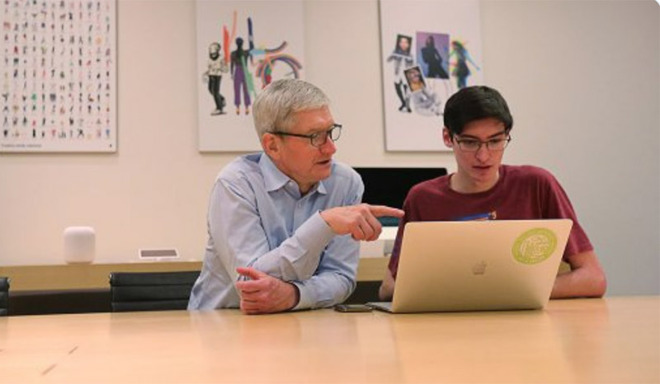
While in Florida for SAP's annual Sapphire user conference, Apple CEO Tim Cook took time out of his schedule to visit meet Worldwide Developers Conference scholarship winner Liam Rosenfeld at an Orlando Apple store.
At the SAP conference, Cook was on hand to introduce an expansion to an existing partnership that will see the German software corporation roll out new enterprise apps infused with Apple technology.
Following the conference, Cook stopped by Apple Store Millenia for a brief sit-down with Rosenfeld, one of 350 U.S. students selected to receive a scholarship to attend WWDC 2019 in June, reports the Orlando Sentinel.
"I was not expecting that at all," Rosenfeld said. "It was such an amazing surprise."
Along with coding his own iOS apps, Rosenfeld, 16, started a coding club at Lyman High School that has grown to 16 members. The sophomore has one app in the App Store, Image to ASCII Art, and is developing two more projects including a game that teaches musicians how to tune their instruments.
Rosenfeld was able to show Cook his work in a short meeting held in the Apple store's conference room. The CEO was impressed with what he saw.
"He has a quality that I think is on a short list of characteristics that drive success, and that is curiosity," Cook said of Rosenfeld.
Speaking to the Sentinel, Cook took the opportunity to push Apple's coding in education agenda, noting WWDC scholarships are doled out in an effort to fill the need for tech-savvy workers. The awards are handed out to students and members of STEM organizations and include free access to the event and lodging.
"You need public, private, non-governmental organizations working together because this is not a trivial transformation that needs to happen here," Cook said. "We have an obligation. We are fortunate to have had some success."
Rosenfeld agrees with Apple's take on the importance of learning to code in school, a skill set that could prove particularly beneficial to K-12 students.
"There aren't many things you can get into in high school and use it to move toward a career path," Rosenfeld said. "Computer science is what is driving change."
Cook tweeted about his meeting with Rosenfeld on Tuesday and included a link to the Sentinel's report.
Source: AppleInsider









