NEWS

Spotify Comes to Apple Watch with Limited set of Options

11/14/2018

2215

Spotify Comes to Apple Watch with Limited set of Options


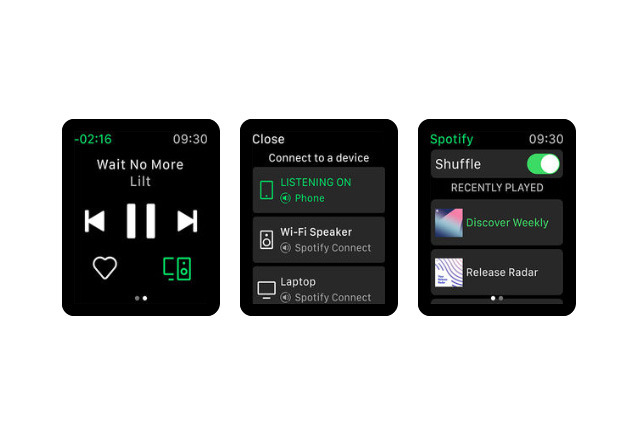
The app, included with Spotify's latest iPhone update, mainly lets users control music being played on an iPhone or other Spotify Connect devices. This includes browsing playlists, and when the service is streaming, the native app will replace Apple's generic music controls.


For quick access Spotify has also included complications, letting people launch with a tap.

Users can't however stream music directly to a Watch, which would be handy for LTE models. Additionally there's no option for local caching as on other platforms, which would guarantee music for GPS models and places with poor internet access. Spotify has promised offline listening down the road.

The Spotify iPhone app is free to download, and runs on iOS 10 or later. An individual Spotify Premium subscription is normally $9.99 per month.


Source: appleinsider

Windows
Mac OS
iOS
Linux
3uTools
Win 64-bit For this device
V9.0 2025-11-11
Download
Win 32-bit For this device
V9.0 2025-11-11
Download
3uTools
Intel Chip How to Identify Chip Type
V9.0 2025-12-02
Download
Apple Chip
V9.0 2025-12-02
Download
How to Identify Chip Type
1.  Click the Apple icon in the top-left corner of the screen and select About This Mac.
2.  Check the Processor or Chip field to determine if it is "Intel" or "Apple".
Please use the 3uTools PC client to install the iOS client:
1、 Install either the Windows or Mac version of 3uTools on your computer
2、 Open the PC client and connect your device to the computer via USB cable
3、 After the connection is successful, wait for the computer to automatically install the mobile app for the device, or locate “Install Mobile App” on the computer and manually click to install.
3uTools
deb file
V3.01 2025-11-20
Download
rpm file
V3.01 2025-11-20
Download
Windows
Windows
iOS
iOS
Android
Android
TV
TV
3uAirPlayer
Win 64-bit For this device
V6.0.2 2025-11-19
Download
Win 32-bit For this device
V6.0.2 2025-11-19
Download
iOS Device Mirroring (No App Required)
1、 Install 3uAirPlayer on the Windows PC
2、 Open Control Center and select Screen Mirroring
3、 From the list, choose your PC to start mirroring
4、 Or connect your iOS device to the PC via USB to begin mirroring
Scan to get "3uAirPlayer" App
3uAirPlayer TV V1.0.18
2025-11-28
TV System Requirements: Android 7.0 or later
Download the TV installation package, copy it to a USB drive, insert it into your TV or set-top box, then select the file from the home screen to install.