 NEWS
NEWS
iPhone XS LTE Speeds up to 266 Percent Faster Than iPhone X, Early Test Reveals
 09/18/2018
 3139
3139
As we head towards the release of the iPhone XS, the first speed tests are teasing what we can expect when it comes to LTE speeds across the major carriers. According to results from SpeedSmart.net, iPhone XS and XS Max will boast quite the improvement from last year's iPhone X.
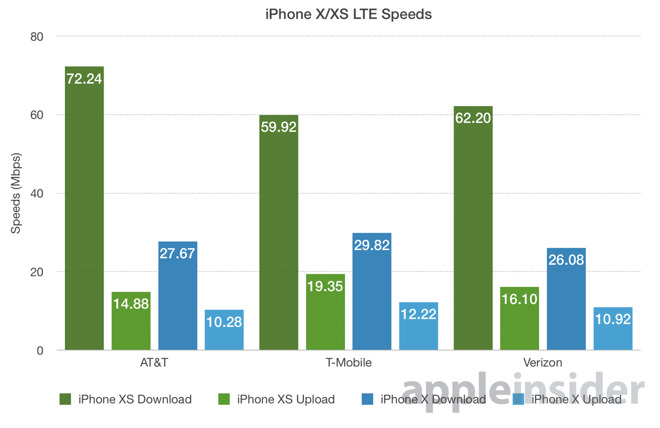
Of the three major carriers — AT&T, Verizon, and T-Mobile — AT&T looks to be the fastest with average download speeds of 72.24Mbps. That figure compares to average recorded iPhone X speeds of 27.67Mbps.
Verizon was the second fastest in this test, with average downloads of 62.20Mbps, up from 26.08Mbps. T-Mobile came in a close third with 59.92Mbps on the iPhone XS, compared with 29.82Mbps on the iPhone X.
When looking at the increases, the new iPhone XS and XS Max show a 233-percent average bump in download speed across the three networks.
Upload speeds were slightly less impressive, with iPhone XS on T-Mobile netting 19.35Mbps, up from the 12.22Mbps seen on iPhone X. Verizon and AT&T hit 16.10Mbps and 14.88Mbps, respectively, up from 10.92Mbps and 10.28Mbps.
The survey was taken using the SpeedSmart Speed Test app on iPhone X, XS, XS Max between Sept. 12 and 16. Though early and surely limited due to a small sample size, the results show impressive gains that should be in line with speeds consumers can expect come Friday.
The greatly enhanced data transfer statistics comes thanks to new Gigabit-class LTE with 4x4 MIMO technology and LAA. With iPhone X, Apple employed two LCP FCPBs to power 2x2 MIMO, while the iPhone 8 series used a single LCP module. The integration of 4x4 MIMO standards with iPhone XS and XS Max delivers much-improved bandwidth capable of supporting higher throughput.
Source: appleinsider










