 NEWS
NEWS
iPad Pro Switching to USB-C, Cheaper MacBook with Touch ID, Apple Watch Gaining ECG
 09/11/2018
 2256
2256
Reliable supply chain analyst Ming-Chi Kuo has published his latest predictions. Included are several new details regarding the mid-sized iPhone “Xr”, new iPads and USB-C, the cheaper MacBook and Touch ID, the Apple Watch Series 4 and ECG, and more. Here’s what Kuo is now predicting from Apple:
6.1-inch iPhone still launching in “late Sep-early Oct due to quality issues of assembly and display” — that’s the rumored iPhone “Xr” which Bloomberg says will launch in limited supply
iPad Pro will feature Face ID and switch from the Lightning port to USB-C for the first time —that’s a new detail — and ship with the new 18W USB-C charger we’ve seen floating around … iPhone will retain 5W charging and Lightning ports
Rumored low-price MacBook may replace 12-inch MacBook in the lineup — and even feature Touch ID without the Touch Bar
Apple Watch with slimmer bezels will support electrocardiography, or ECG, (read about the benefits here) and use ceramic backs on all models — aluminum without LTEcurrently uses composite glass
Kuo’s graphic for the research note also includes AirPods 2 and the AirPower charging mat, although it’s unclear if Kuo predicts new AirPods with the “Hey Siri” feature as rumored or just the new charging case that works with AirPower.
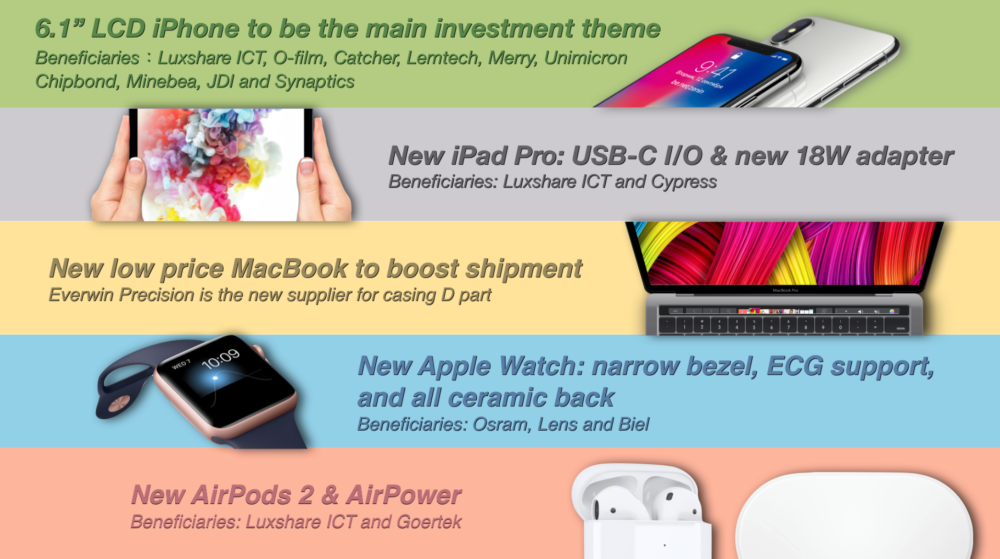
While Kuo’s memo mentions both the new iPad Pro with USB-C (wow) and MacBook with Touch ID, it’s still unclear at this point if we’ll see the iPad and Mac on stage at Wednesday’s event, or if the September 12 date will be dedicated to iPhone and Apple Watch.
We expect Apple to unveil three new iPhones — an updated 5.8-inch OLED model called iPhone Xs, a 6.1-inch LCD model possibly called iPhone Xr, and an even larger 6.5-inch OLED model likely called iPhone Xs Max — with OLED models offered in a new gold finish and LCD models offered in a variety of other colors.
Apple Watch Series 4 — which 9to5Mac also exclusively shared the first look at — will feature a much larger display in a likely similar size casing. This larger screen will accommodate more information dense watch faces like the one seen in the leaked marketing image.
Kuo’s detail about all watch models switching to ceramic backs this year could mean Series 4 is only offered with LTE; Series 3 uses ceramic for aluminum models with LTE (and stainless steel and ceramic cases) while GPS-only aluminum models without LTE still use composite glass.
The big takeaways news wise is the potential switch from Lightning to USB-C for iPad Pro. That would be a massive change for an iOS device but one that could improve the iPad accessory ecosystem — and be a boon for productivity. Kuo’s memo does not suggest that this is simply a change from USB-A Lightning to USB-C Lightning but instead an actual port change on the iPad itself.
Source: 9to5mac









