 NEWS
NEWS
‘iPhone Xs Max’ Likely Name for 6.5-inch OLED Flagship, Sources Say
 09/06/2018
 2211
2211
Last week 9to5Mac exclusively shared the first look at the new iPhone Xs models due to be officially announced by Apple on September 12. We’ve since learned that Apple has considered the name “iPhone Xs Max” for the larger 6.5-inch version, according to two sources familiar with Apple’s marketing plans.
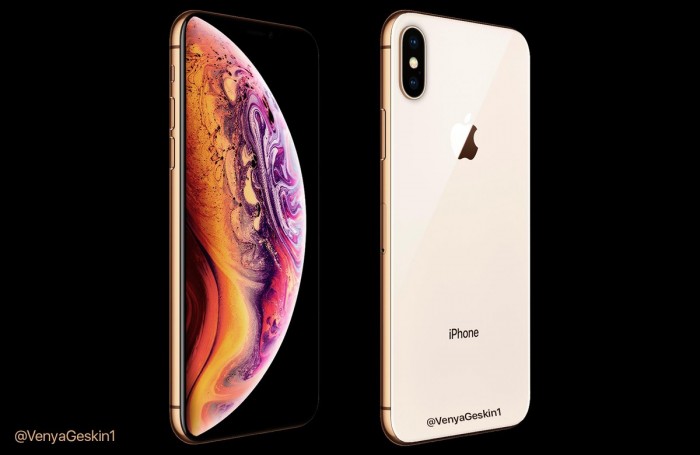
Included in our reporting last week was the new detail that “iPhone Xs” will be the name of Apple’s new OLED models while confirming two size options and a new gold finish for the stainless steel sides. We’ve since heard that Apple will likely use “iPhone Xs Max” as the marketing name for the larger version of the new models.
Apple has offered two size versions of the same generation of iPhone since the iPhone 6, assigning a modifier to the larger version, but “Plus” has been the label before now. iPhone Xs and iPhone Xs Max are expected to replace the pattern started by iPhone 6 and iPhone 6 Plus. Bloomberg has previously reported that Apple has considered dropping the “Plus” label for this year’s larger version.
In addition to the confirmed details, the new iPhone Xs and Xs Max are expected to include 4GB of RAM, up from 3GB, dual SIM options in some markets on the larger model, and a speed boost with a new A12 chip.
Apple has already announced that it will hold its next special event on September 12 at Steve Jobs Theater in Cupertino. Apple will unveil the iPhone Xs, iPhone Xs Max, a mid-sized LCD version that will cost less than the iPhone Xs models, the Apple Watch Series 4, and more.
Source: 9to5mac









