
NEWS

The Conceptual Apple Watch Series 4 Reimagined with a Round Design

09/05/2018

2362

We now have just over one week left to wait until Apple hosts its big iPhone XS event, and the hype is reaching new highs. Apple fans can’t wait to see the next-generation products Apple is set to unveil at 2018’s “fall event,” which happens to take place each year in late summer. 


The Apple Watch has kept the same design since it was first released more than three years ago in April 2015. But now, in just over one week, we’ll see the first model to ever get a significant design update. The Apple Watch Series 4 will feature the same basic look as the three models that have come before it, but it will feature much larger OLED screens stuffed into the same sized cases since Apple has found a way to make the bezels surrounding the screen much smaller than they have been on previous models. The Series 4 also looks like it might be a bit thinner than earlier Apple Watch models. Here's a leaked marketing render that shows Apple's new design:

The Conceptual Apple Watch Series 4 Reimagined with a Round Design


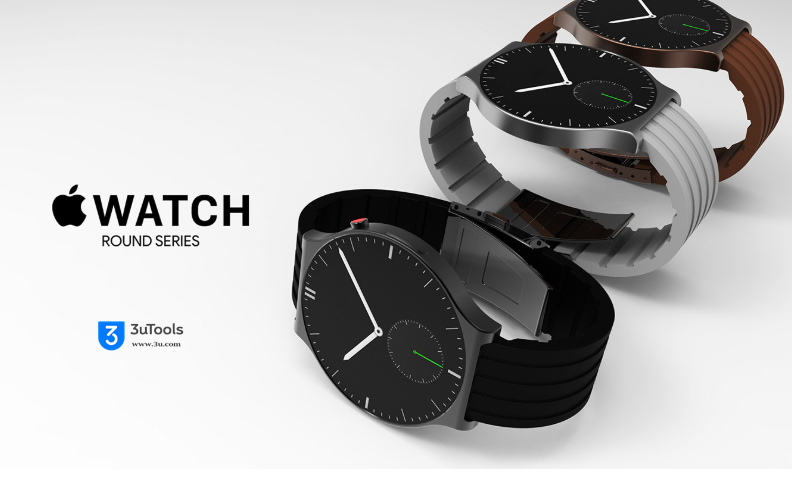
As great as the new Apple Watch Series 4 looks, many Apple fans still find themselves wishing for a round version of the Apple Watch. While the watch’s current rectangular shape is idea for displaying information, round watches are a bit more traditional and many people prefer the look of a round watch. Graphic designer Muhsin M. Belaal Auckburaully does as well, and he decided to dream up a round version of the Apple Watch. The result is as unrealistic as it is stunning, but it’s stunning nevertheless.


Source: bgr

Windows
Mac OS
iOS
Linux
3uTools
Win 64-bit For this device
V9.0 2025-11-11
Download
Win 32-bit For this device
V9.0 2025-11-11
Download
3uTools
Intel Chip How to Identify Chip Type
V9.0 2025-12-02
Download
Apple Chip
V9.0 2025-12-02
Download
How to Identify Chip Type
1.  Click the Apple icon in the top-left corner of the screen and select About This Mac.
2.  Check the Processor or Chip field to determine if it is "Intel" or "Apple".
Please use the 3uTools PC client to install the iOS client:
1、 Install either the Windows or Mac version of 3uTools on your computer
2、 Open the PC client and connect your device to the computer via USB cable
3、 After the connection is successful, wait for the computer to automatically install the mobile app for the device, or locate “Install Mobile App” on the computer and manually click to install.
3uTools
deb file
V3.01 2025-11-20
Download
rpm file
V3.01 2025-11-20
Download
Windows
Windows
iOS
iOS
Android
Android
TV
TV
3uAirPlayer
Win 64-bit For this device
V6.0.2 2025-11-19
Download
Win 32-bit For this device
V6.0.2 2025-11-19
Download
iOS Device Mirroring (No App Required)
1、 Install 3uAirPlayer on the Windows PC
2、 Open Control Center and select Screen Mirroring
3、 From the list, choose your PC to start mirroring
4、 Or connect your iOS device to the PC via USB to begin mirroring
Scan to get "3uAirPlayer" App
3uAirPlayer TV V1.0.18
2025-11-28
TV System Requirements: Android 7.0 or later
Download the TV installation package, copy it to a USB drive, insert it into your TV or set-top box, then select the file from the home screen to install.




