 NEWS
NEWS
Apple Blocks its Gay Pride Watch Face in Russia
 09/03/2018
 2458
2458
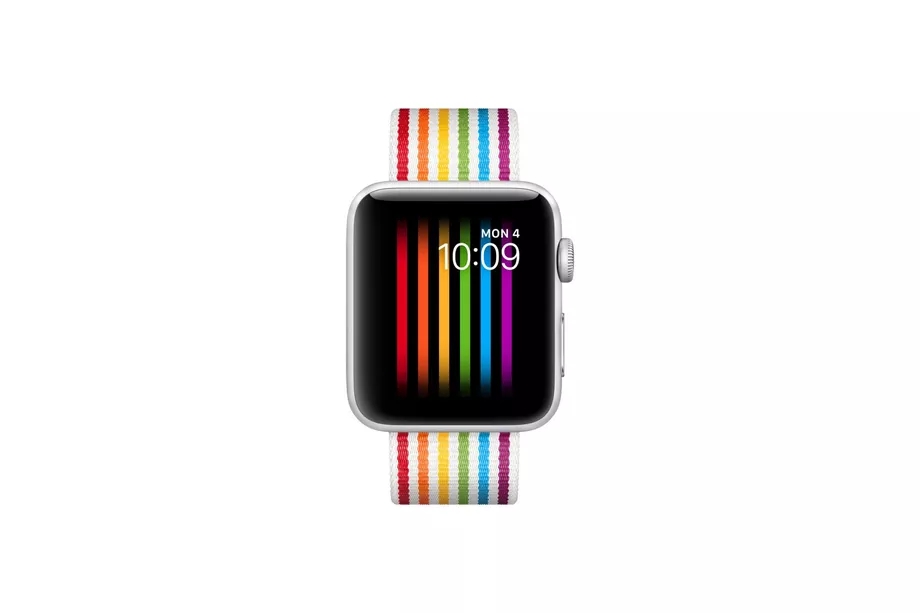
Apple first introduced its pride Apple Watch face during the company’s Worldwide Developers Conference (WWDC) in June. Inspired by the rainbow flag, it’s designed to celebrate gay pride and stand against discrimination to LGBTQ people. While Apple regularly touts its “unwavering commitment to equality and diversity” in highly-produced gay pride videos, the company has its limits. iOS developer Guilherme Rambo has discovered that the pride Apple Watch face is “hardcoded to not show up if the paired iPhone is using the Russian locale.”
Reddit users and Apple support forum users have been questioning the lack of a pride watch face in Russia over the past couple of months. The Verge has tested this on an iPhone running the latest iOS 12 beta, and the pride watch face simply disappears once you switch to the Russian locale.
Apple’s pride Watch face simply disappears in Russia https://t.co/Pn1c8o9c8y pic.twitter.com/1wRDbFVqIt
— Tom Warren (@tomwarren) August 31, 2018
Russia implemented a “gay propaganda” law in 2013, which the European Court of Human Rights ruled reinforces prejudice and encourages homophobia. The law comes with the threat of jail time and fines for what Russia deems to be offensive speech. Apple appears to be avoiding this particular legal quandary. Apple sells a special pride edition Apple Watch strap, donating a portion of the proceeds toward LGBTQ advocacy organizations. But it doesn't sell it in Russia, either.
Google targeted Russia’s anti-gay laws with a rainbow Olympics homepage during the Winter Olympic Games in Russia in 2014. The Google homepage, including the Russian version, was changed to show a rainbow-inspired Google Doodle and the Olympic Charter, which calls for the Olympic spirit of no discrimination of any kind against every individual practicing sport.
Source: the verge










