
NEWS

Twelve South Launches 'AirSnap' Leather Carrying Case for AirPods

08/02/2018

2402

Twelve South Launches 'AirSnap' Leather Carrying Case for AirPods


Twelve South today revealed its latest Apple accessory called the "AirSnap," which is a case made for AirPods and aimed at making the wireless headphones easier to keep handy thanks to an attached metal clip. 
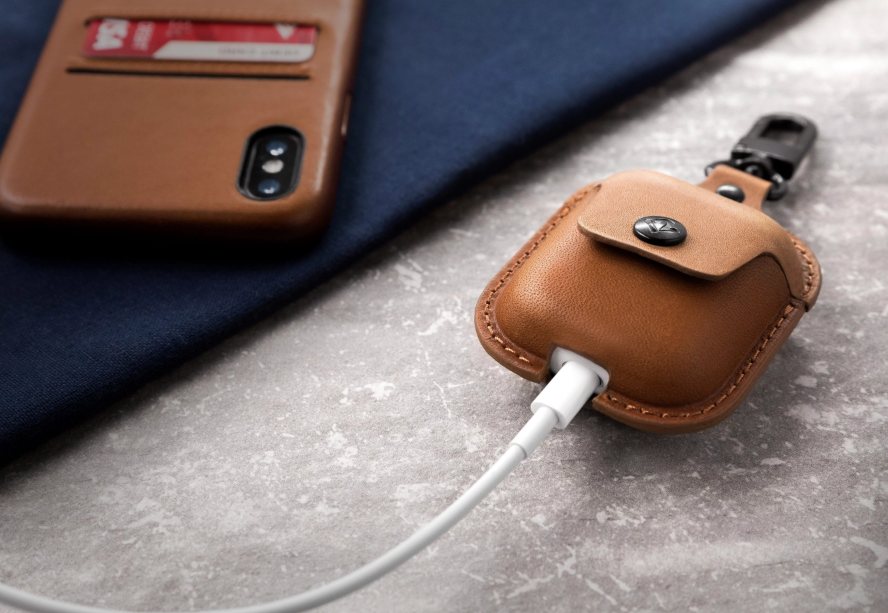

Twelve South Launches 'AirSnap' Leather Carrying Case for AirPods


AirSnap is made from full-grain leather and helps to protect both the AirPods and AirPods case while on-the-go. The bottom of the case has a cutout so that you don't have to remove the AirPods from the AirSnap to charge them. 


Twelve South says one of the main features of AirSnap is the carabiner style metal clip: 


AirSnap features a carabiner-style clip allowing you to attach this little case to a backpack, purse, keychain or anything else that goes wherever your AirPods need to go. By connecting AirSnap to your bag, you’ll know both your AirPods and Charging Case will be with you. The black carabiner also swivels, making it easy to grab or put your AirPods away. 


Those interested can purchase AirSnap from TwelveSouth's website for $29.99 in Deep Teal and Black, and a Cognac version is available to pre-order and should ship the week of August 6. 

The AirSnap follows the launch of Twelve South's last product, which was also designed for AirPods, called "AirFly." That accessory acts as an adapter so that you can use AirPods (or any Bluetooth headphones) where only wired headphone jacks are available, like on a plane, at the gym, or with the Nintendo Switch.


Source: macrumors

Windows
Mac OS
iOS
Linux
3uTools
Win 64-bit For this device
V9.0 2025-11-11
Download
Win 32-bit For this device
V9.0 2025-11-11
Download
3uTools
Intel Chip How to Identify Chip Type
V9.0 2025-12-02
Download
Apple Chip
V9.0 2025-12-02
Download
How to Identify Chip Type
1.  Click the Apple icon in the top-left corner of the screen and select About This Mac.
2.  Check the Processor or Chip field to determine if it is "Intel" or "Apple".
Please use the 3uTools PC client to install the iOS client:
1、 Install either the Windows or Mac version of 3uTools on your computer
2、 Open the PC client and connect your device to the computer via USB cable
3、 After the connection is successful, wait for the computer to automatically install the mobile app for the device, or locate “Install Mobile App” on the computer and manually click to install.
3uTools
deb file
V3.01 2025-11-20
Download
rpm file
V3.01 2025-11-20
Download
Windows
Windows
iOS
iOS
Android
Android
TV
TV
3uAirPlayer
Win 64-bit For this device
V6.0.2 2025-11-19
Download
Win 32-bit For this device
V6.0.2 2025-11-19
Download
iOS Device Mirroring (No App Required)
1、 Install 3uAirPlayer on the Windows PC
2、 Open Control Center and select Screen Mirroring
3、 From the list, choose your PC to start mirroring
4、 Or connect your iOS device to the PC via USB to begin mirroring
Scan to get "3uAirPlayer" App
3uAirPlayer TV V1.0.18
2025-11-28
TV System Requirements: Android 7.0 or later
Download the TV installation package, copy it to a USB drive, insert it into your TV or set-top box, then select the file from the home screen to install.




