 NEWS
NEWS
Future Apple Watch Add-ons Could Help you Avoid Sunburn
 07/20/2018
 2369
2369
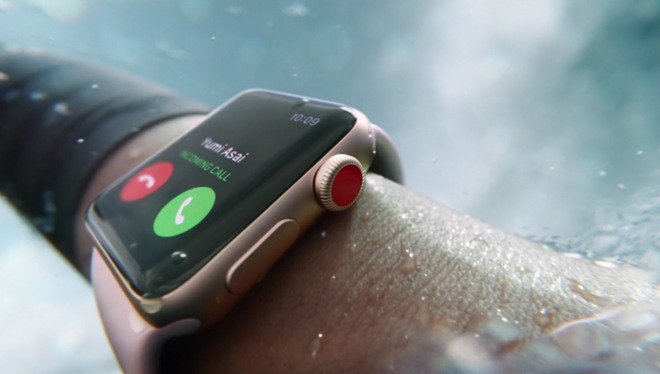
The patent application for "Light-based Shielding Detection," published by the US Patent and Trademark Office on Thursday and originally filed in December 2017, describes a 'sunscreen detector that could be used on a portable device, which Apple suggests could be a wearable device.
While sunscreen can be characterized by its sun protection factor (SPF), Apple notes, its effectiveness could be affected by a number of factors, such as how much is applied, active ingredients breaking down, the sunscreen's water resistance, and the user's skin sensitivity. Monitoring this could help users reapply more sunscreen, and help prevent sunburn.
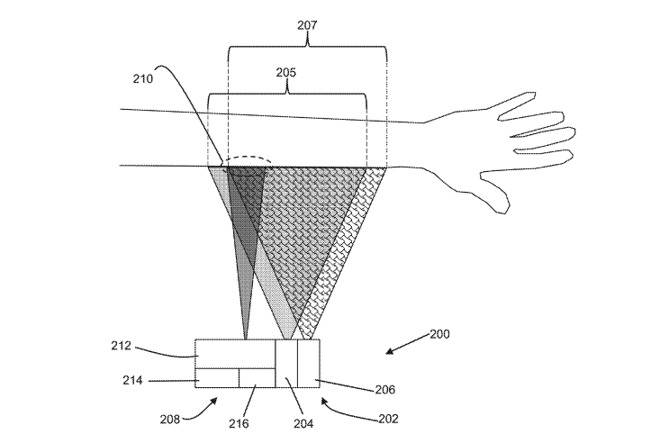
The core of the application is a "UV-IR spectrometer," an ultraviolet and infrared detector that could be configured to show exposed areas of a user's skin. The device it is connected to could potentially show areas or "entire body parts" that are lacking in protection or are completely unprotected, as well as notifying where and how often to apply more sunscreen.
A variation of this idea is a UV-IR spectrometer accompanied by an illumination system that can produce UV and IR-spectrum light, allowing for detection in sheltered or darker conditions, like a hotel room. The detected unprotected areas can be created into a graphic that overlays an image or video feed provided by a camera, potentially using augmented reality.
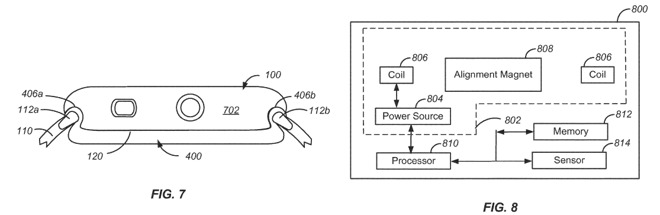
The second patent application, "Auxiliary electronic device attachable to a wearable electronic device," deals with an add-on for the Apple Watch. Shown in pictures, the concept is to create a housing for the Apple Watch that mostly fits behind the device, but with a pair of lugs at the top and bottom allowing it to connect to Watch bands, with the entire assembly constructed in such a way that it is practically hidden entirely by the Apple Watch.
The plate section would include an alignment magnet, its own processor and memory, a power source, and various sensors. As the plate communicates with the Apple Watch, these sensors could be used to add new features to the Apple Watch, without needing to build them in to the device, or for an Apple Watch user to be forced to buy a version with said sensors.
Apple has previously been linked to the development of a non-invasive glucose reader, which would potentially fit in alongside the other health-related sensors already used in the Apple Watch. It is expected such a sensor wouldn't be available in the Apple Watch for a number of years, as it would most probably require approval from the U.S. Food and Drug Administration.
A more immediate use for the plate is for it to hold a battery that can be used to supplement the one built into the Apple Watch, extending its battery life considerably. Rather than requiring contacts, spoiling the external appearance of the Apple Watch, the power could be transferred using wireless charging coils, utilizing the device's existing charging system.
This is not the first time Apple has gone to the USPTO with an extension for the Apple Watch, as in April it received a patent for an identically-named item. The latest filing was submitted in March, one month before the patent was granted.
Source: appleinsider









