 NEWS
NEWS
Apple Confirms its 2018 MacBook Pro Keyboard has a 'Membrane' to Prevent Debris
 07/20/2018
 2723
2723
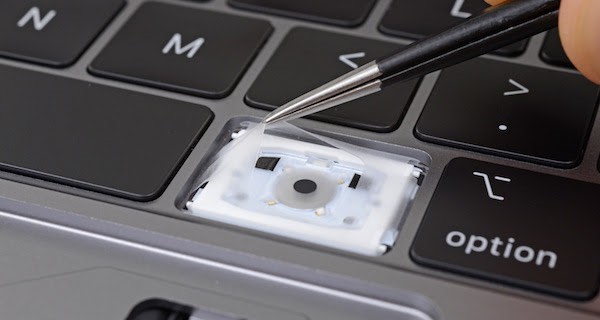
In an internal document distributed to Apple Authorized Service Providers, obtained by MacRumors from multiple reliable sources, Apple has confirmed that the third-generation keyboard on 2018 MacBook Pro models is equipped with a "membrane" to "prevent debris from entering the butterfly mechanism."
The relevant excerpt from Canadian and European versions of Apple's internal 2018 MacBook Pro Service Readiness Guide:
"Keyboard and KeycapsThe keyboard has a membrane under the keycaps to prevent debris from entering the butterfly mechanism. The procedure for the space bar replacement has also changed from the previous model. Repair documentation and service videos will be available when keycap parts begin shipping."
While the U.S. version of this Service Readiness Guide does not mention the membrane, it contains a link to a separate internal document titled "Butterfly Mechanism Keycap Replacement MacBook Pro (2018)" that does:
"Caution: The keyboard has a membrane under the keycaps to prevent debris from entering the butterfly mechanism. Be careful not to tear the membrane. A torn membrane will result in a top case replacement."In its teardown of the new 13-inch MacBook Pro with Touch Bar last week, the repair experts at iFixit were first to discover the thin, silicone barrier underneath the keycaps, and theorized that it was to prevent dust indeed. Apple filed a patent for a contaminant-resistant MacBook keyboard back in 2016.
Publicly, Apple has only confirmed that 2018 MacBook Pro models feature an "improved third-generation keyboard for quieter typing," but many suspected that the silicon membrane was actually to prevent "contaminant ingress," fancy speak for the crumbs from your sandwich that you ate at your desk for lunch.
Following years of anecdotal complaints from customers, and a few class action lawsuits, Apple initiated a worldwide service program last month, offering free repairs of 2015-and-later MacBook and 2016 and 2017 MacBook Pro keyboards, which are equipped with low-profile butterfly switch mechanisms.
We've already reported about the service program in more detail, but the gist is that those particular MacBook and MacBook Pro models can experience issues with sticky, unresponsive, or inconsistently functioning keys when small particles like dust or crumbs get stuck underneath the shallower keycaps.
Apple confirmed to MacRumorsthat third-generation keyboards will not be offered as replacements under its service program for 2016 and 2017 MacBook Pro second-generation keyboard repairs, likely due to a tweaked top case design.
Source: macrumors









