 NEWS
NEWS
Study finds iPhone 6 Has Highest Failure Rate Among iPhones
 07/13/2018
 3748
3748
A new study by a security firm finds that the iPhone 6 and iPhone 6S are much more likely to fail than any other iPhone model —however, Samsung has a failure rate higher than that of any other manufacturer tracked by the firm.
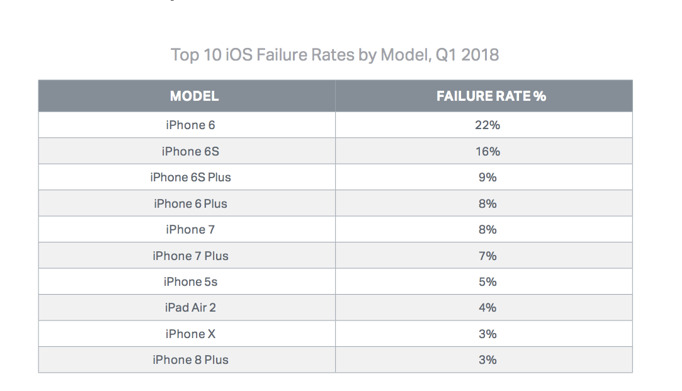
According to "State of Mobile Device Repair & Security," a new report released this month by security and data erasure firm Blancco, the iPhone 6 has a failure rate of 22 percent, with the iPhone 6S coming in second at 16 percent. Every other active iPhone model is in the single digits, with the iPhone X and iPhone 8 Plus listed at 3 percent each.
While the iPhone 6 generation has had the highest failure rate among the last several Blancco quarterly reports, the firm noted that recent software updates have adversely affected the iPhone 6's battery lifespan.
There were two separate issues affecting the iPhone 6 in 2017. First, there were battery-manufacturing issues for a limited number of iPhone 6 units, which led to a battery-replacement program.
The second issue revolves around the release of iOS 10.2.1 in February 2017, which included the throttling routines to prevent a crash of an iPhone under load when powered by a chemically depleted battery. Apple was less than transparent about what the update specifically did to prevent the crash.
However, Samsung's overall failure rate of 27.4 percent is both the highest of any Android manufacturer and higher than the highest rate for an iPhone, Blancco said.
The report also found that Bluetooth is the most likely performance issue to affect iOS devices, followed by Wi-Fi, headset and mobile data, while "performance" is the biggest problem for Android, followed by the camera, microphone and battery charging.
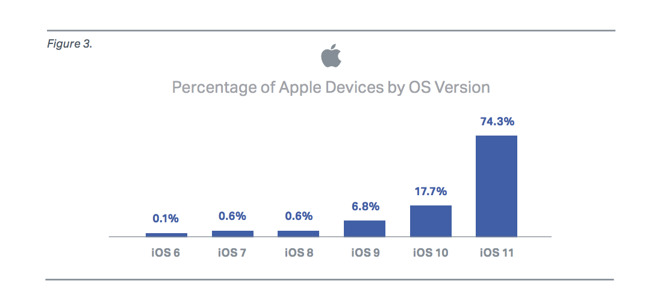
In addition, Blancco found that while 74.3 percent of iOS devices run iOS 11 and an additional 17.7 percent run iOS 10, more than 50 percent of Android customers are still using "Nougat," the operating system from 2016. Apple keynotes regularly point out similar disparities.
Blancco's data, it's worth noting, comes from "data collected from iOS and Android devices brought into wireless carriers and device manufacturers for Blancco testing and erasure," so it doesn't represent a representation of all users of the devices and operating systems.
Source: appleinsider










