 NEWS
NEWS
Apple Wins Patent for Round-faced Apple Watch
 05/09/2018
 2446
2446
Apple has today been awarded a patent for technology intended for use in a ‘circular display.’ The patent text specifically references a wristwatch as one application, and one of the illustrations looks very much like a watch …
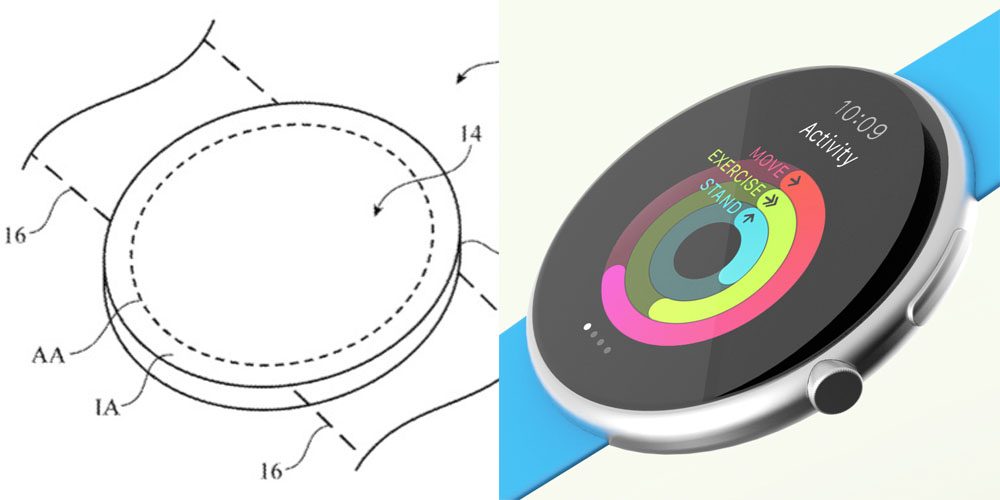
The patent itself is for a particular approach to handling the challenges posed by circular displays.
Pixel arrays often have rectangular shapes. However, rectangular pixel arrays will not fit efficiently within a device having a circular shape. Circular displays can have bottleneck regions in which signal lines become crowded, leading to inefficient use of display area. It would therefore be desirable to be able to provide improved displays such as circular displays or other displays with curved edges.
The specifics get very technical very fast, so we’ll leave you to read the patent for yourself if you’re interested. What’s of broader interest is whether it signals the company’s interest in a future Apple Watch with a circular display?
We frequently caution that Apple patents all kinds of things that never make it into products. These include product ideas which the company has explored and subsequently rejected, which would be the obvious interpretation here.
However, as Patently Apple notes, that doesn’t appear to be the case.
Considering that Apple filed for this patent 8 months after the original Apple Watch debuted with its rectangular interface and likely years after the original Apple Watch patents for a watch, Apple’s management gave their engineers this project to work on. So this isn’t a rejected design after the fact, it’s a purposeful engineered solution to make a round interface work for Apple Watch should Apple ever decide to bring this to market.
None of which means Apple necessarily plans to make one. Apple may have rejected the idea at a later date, it could be a protective patent to make it harder for other companies to compete, or it could be technology the company plans to use in other devices with curved-edge displays, such as iPhones. But it’s certainly interesting to speculate.
Circular displays are inherently inefficient compared to rectangular ones, in terms of the amount of useful data that can be displayed in a given area – one reason some think Apple would never do it. But round watch faces do still have their fans for aesthetic reasons, so information density isn’t the only factor the company might consider.
Source: 9to5mac











