 NEWS
NEWS
Apple Ramps Up iOS 12 and macOS 10.14 Testing as we Get Closer to WWDC Unveiling
 04/20/2018
 2817
2817
Whilst there may not be as many new features this year in the flagship Apple operating systems as some years past, there is no mistaking that iOS 12 and macOS 10.14 are very much under active development and distribution amongst internal Apple employees is growing.
Our website analytics have recorded a noticeable uptick in Safari browser visits from iOS 12 and macOS 10.14 machines, particularly with bigger spikes just this week.
It is normal practice for Apple engineers to test out internal seeds by using devices running pre-release firmware and operating systems to visit sites like ours.
Every year, we observe the same rough pattern. Around the fall, Apple begins to sketch out what engineering and design resources should be prioritised for the coming year’s flagship software operating systems. These new firmware identifiers start showing up in our logs from January in the single digits. By March, the number of devices increases significantly well into the hundreds of unique users.
This year, we expect to see iOS 12, macOS 10.14, watchOS 5 and tvOS 12. As watchOS and tvOS lack browsers, it’s much harder to find references to them as an outsider.
iOS 12 and macOS 10.14 is reflected in our analytics in keeping with the annual tradition. iOS 12 usage is predominantly from the 5.8-inch iPhone X screen resolution, followed by the iPad screen resolutions. These devices are mostly located in Cupertino, San Francisco and the Bay Area with a surprise inclusion of Shanghai as a top city.
We have also heard from a few developers of top apps who have also seen iOS 12 devices show up in their logs. Apple obviously has to test app and website compatibility with the new firmware. Apple sometimes includes special codepaths in UIKit and AppKit specifically to avoid crashes in the most popular App Store apps, until the developers get a chance to update their app’s codebase.
We have also seen some testing of iOS 11.4.1, but nothing beyond that — it seems like most of Apple is working on the next-gen major versions.
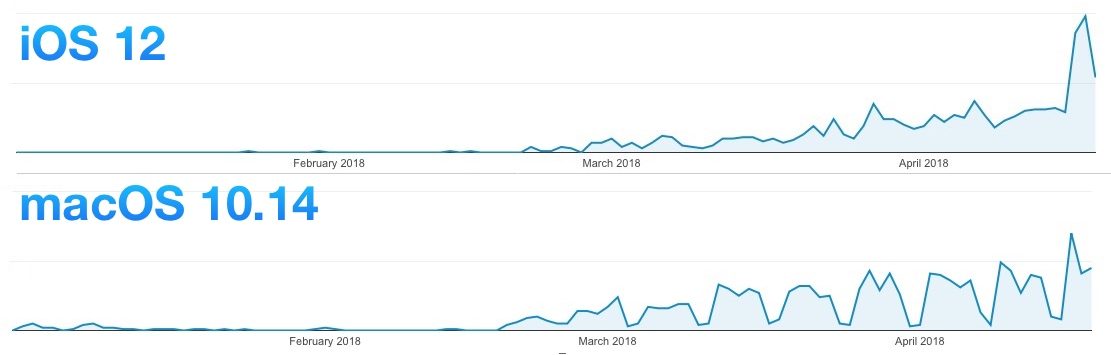
What readers should note is that the first beta 1 of iOS 12, the seed that is released to developers after the WWDC keynote, is usually ‘done’ and frozen internally in mid-May.
Of course, customers will get their first glimpse of the operating systems on June 4, the first day of Apple’s Worldwide Developer Conference. The big news for macOS this year is reported to be some kind of cross-platform framework, to help developers bring their iOS apps to the Mac platform.
Whilst iOS 12 is expected to have a focus on performance and reliability, there will still be a handful of new features including new parental controls options, updates to Animoji and FaceTime, new AR features and Health updates … hopefully with some surprises along the way too!
Source: 9to5mac









