 NEWS
NEWS
New Sixth-Generation iPad vs. 10.5-Inch iPad Pro
 03/29/2018
 2984
2984
Support for the Apple Pencil was one of the major differentiating factors between the fifth-generation iPad and the 10.5-inch iPad Pro, with Apple Pencil connectivity limited to Apple's more expensive flagship tablets.
Now that Apple Pencil support has been built into the sixth-generation iPad, which costs just $329, the Apple Pencil is far more accessible and there's less separating Apple's cheapest tablet from its priciest models. In the video and post below, we go over all of the differences between the new iPad and the existing iPad Pro.
The iPad Pro and the sixth-generation iPad may seem similar at first glance due to the shared Apple Pencil support, but the iPad Pro continues to offer a faster processor, better cameras, and a better display to justify its high price tag.
Apple's iPad Pro, for example, uses ProMotion technology with a 120Hz refresh rate, which makes all motion on the screen smoother, crisper, and more responsive.
It's dramatically different than other iPad displays with smoother text, better gameplay, and enhanced videos. True Tone technology, which adjusts the white balance of the display to match the ambient lighting is also an iPad Pro-only feature, as is wide color, for brighter, more vivid colors.
The sixth-generation iPad, meanwhile, uses the same non-laminated display that was first used in the iPad Air, albeit with improvements to make it brighter and a new touch sensor to allow for Apple Pencil support. It's Retina, but otherwise unremarkable.
The iPad Pro is also using an A10X Fusion chip, new in 2017, while the iPad is equipped with the A10 Fusion from the 2016 iPhone 7 and iPhone 7 Plus. Major improvements have been made in processor and GPU speed in recent iterations, so the iPad Pro is going to be a good bit faster than the iPad, though you're not going to notice in everyday tasks.
If camera quality is of importance, the iPad Pro has the latest 12-megapixel f/1.8 camera that is leagues better than the 8-megapixel f2.4 camera in the iPad. The iPad Pro's camera supports a laundry list of features not available in the iPad, like True Tone Flash, stabilization for live photos, wide color capture, 4K video recording, and more.
The iPad Pro's front-facing camera is also 7-megapixels, a big upgrade over the 1.2-megapixel front-facing camera in the iPad. To make it easy to compare the two tablets at a glance, we've made a handy chart that also includes the fifth-generation iPad: 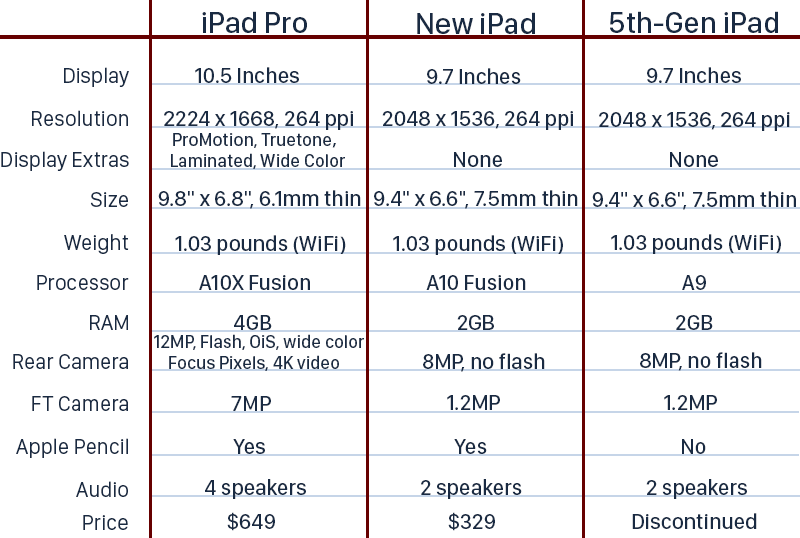
So which one should you buy? If you want an impressively fast but affordable tablet that works with Apple Pencil and is going to play the most recent games and apps for several years to come, go with the iPad.
If you want the fastest, thinnest device you can get with the absolute best display available on the market, go with the iPad Pro, but don't buy right now if you can hold out for a refresh. We're expecting to see updated iPad Pro models either in June or September with slimmer bezels, no Home button, and support for the Face ID facial recognition system first introduced in the iPhone X.
Source: macrumors









