 NEWS
NEWS
Convert Your Vintage Apple Disk II to Play DVDs And BluRays
 02/06/2018
 3704
3704
When we saw this vintage Apple Disk II drive on Slashgear, we had to share it with you.
The drive was originally designed for 5 and a quarter inch floppy drives. The ones that fold in two if you sit on them.
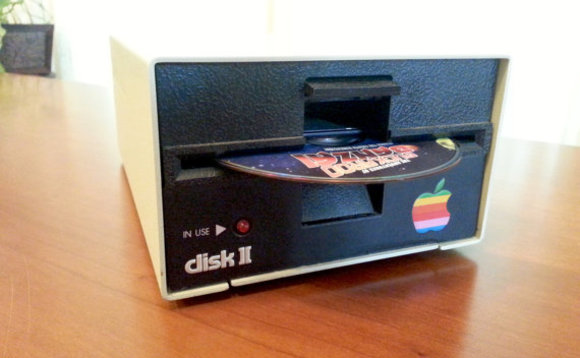
But Retroconnector has gutted the casing and turned it into something fabulously useful. Ish. An optical drive.
Yes, the outmoded technology has been replaced by some slightly less outmoded technology that will play CDs, DVDs and BluRays, via a USB 3.0 connection.
It's as authentic looking as can be, right down to the springs that "spit" the discs out, just as the floppy drives would have been.
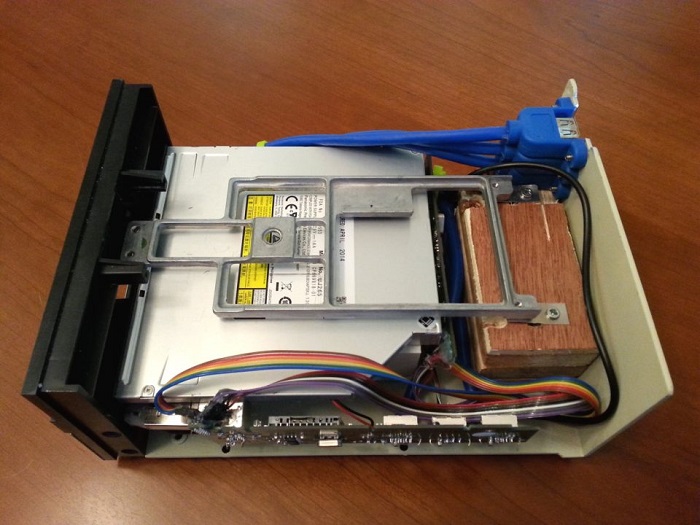
But best of all, this isn't just the one-off stuff of a madman, this is something you can buy, if you have £366.06 (plus shipping) to spend. Yes, it's mad, it's confusing, it's an Etsy price.
Here's the explanation: "I repurpose the shell of an Apple Disk II, the iconic 5 1/4'' floppy drive originally introduced in 1978. The mechanism and circuit boards are replaced with a USB 3 Blu-Ray drive that will also read and write CDs and DVDs. Aside from the USB and power plugs on the back, the drive looks just like an unmodified Disk II. The spring-loaded drive door hinges open and shut with that same satisfying THUNK! and the disk activity LED blinks when the drive is accessed."
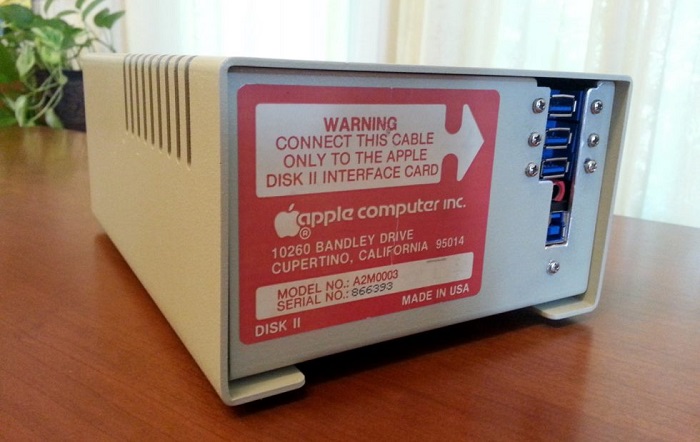
Better yet, if you have one of the 1978 drives knocking around, you can trade it in, and get $50 off having it converted. There's even an option to add in a USB card reader.
This is far from Retroconnector's first effort. As well as a similar product based on the Atari 1050 drive, there's a range of jewellery, and an Apple Watch stand made to look like an old Mac. Plus there's the obligatory Raspberry Pi case that looks like an Apple.
Source: theinquire









