 NEWS
NEWS
iPhone Was Best Selling Smartphone in Q4 2017 Amid Industry Wide Decline
 02/03/2018
 2584
2584
Apple yesterday announced that it sold 77.3 million iPhones during the first fiscal quarter of 2018 (fourth calendar quarter of 2017), and according to data shared by Strategy Analytics, Apple's record sales made the iPhone the top selling smartphone in the world during the quarter.
In Q4 2017, Samsung shipped 74.7 million phones, 2.6 million fewer than Apple's 77.3 million. Other vendors like Huawei and OPPO shipped far fewer devices at 41 million and 29.5 million, respectively. Apple also beat out competitors with the average selling price of its iPhones during the quarter, which came in at $796.
Apple beat out all other smartphone vendors including Samsung, Huawei, OPPO, and Xiaomi, but its overall iPhone shipments were down from 78.3 million in the year-ago quarter. It's worth noting, however, that Q4 2017 was a 13 week quarter, while Q4 2016 was a 14 week quarter.
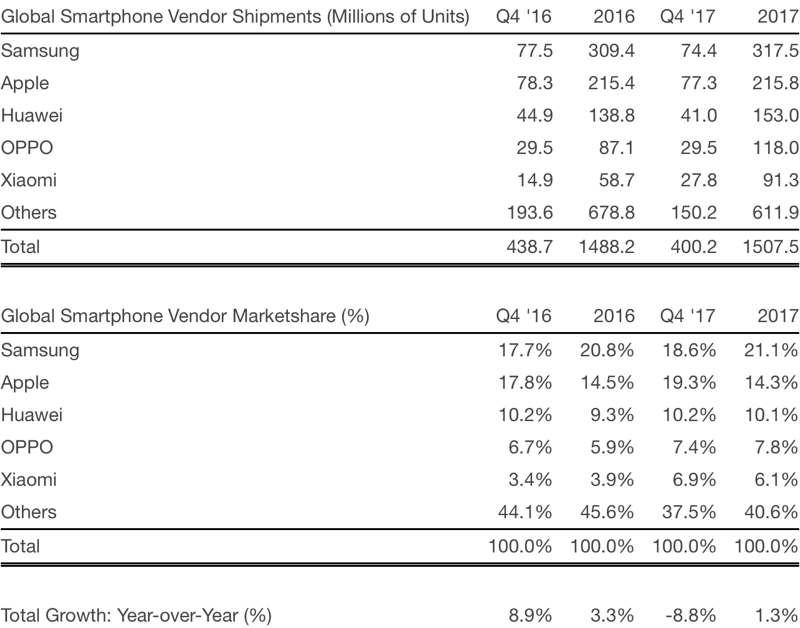
While Apple came out on top in global smartphone shipments during the quarter, Samsung continues to be the top vendor overall. Apple's share of the market was 19.3 percent in Q4 2017, compared to Samsung's 18.6 percent, but its overall marketshare for 2017 was 14.3 percent, compared to Samsung's 21.1 percent.
Overall global smartphone shipments declined year over year, falling from 438.7 million units in the fourth quarter of 2016 to 400.2 million in the fourth quarter of 2017. According to Strategy Analytics, it was "the biggest annual fall in smartphone history."
Over the course of 2017, though, smartphone shipments actually grew 1 percent and topped 1.5 billion units for the first time ever.
Apple does not break down its iPhone sales, but yesterday, Apple CEO Tim Cook said that the iPhone X has been the top selling iPhone every week since it shipped in December. Cook also said that the iPhone X, iPhone 8, and iPhone 8 Plus lineup brought in the highest revenue of any lineup in the company's history.
Source: macrumors









