 NEWS
NEWS
Apple's iPhone 8 Plus Was the Top Selling iPhone in the U.S. During Q2 2018
 07/27/2018
 2948
2948
Apple's iPhone 8 Plus was the number one selling iPhone in the United States during the second quarter of 2018 according to new data shared today by Consumer Intelligence Research Partners.
The iPhone 8, iPhone 8 Plus, and iPhone X accounted for 54 percent of US iPhone sales during the quarter, with the iPhone 8 making up 13 percent of sales, the iPhone 8 Plus making up 24 percent of sales, and the iPhone X making up 17 percent of sales.
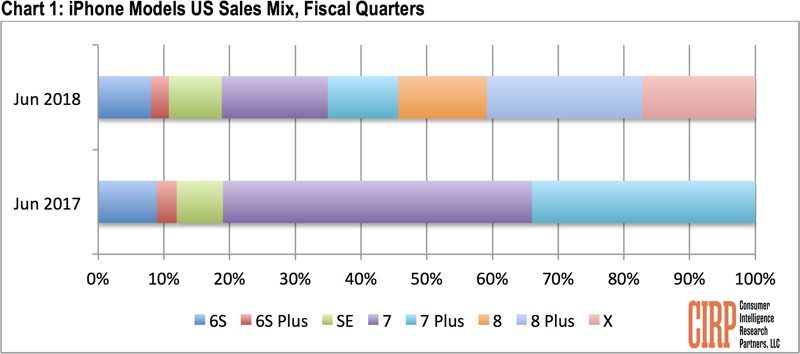
Older iPhones continued to be popular as well, with the iPhone 7, 7 Plus, SE, 6s Plus and 6s making up 46 percent of sales. Apple's Q2 2018 sales are a deviation from its Q2 2017 sales, where the iPhone 7 and 7 Plus, the flagship phones at that time, made up more than 80 percent of sales.
In what is usually a quieter quarter for iPhone sales, the model breakdown is interesting, as older models persisted in popularity," said Josh Lowitz, CIRP Partner and Co-Founder. "The latest iPhone 8, 8 Plus, and X models accounted for a little more than half of sales, yet last year at this time the then-latest iPhone 7 and 7 Plus accounted for over 80%. And, the iPhone 6S, 6S Plus, and SE grabbed 20% in the past quarter, virtually the same as in the June 2017 quarter, though at lower price points. So, it looks like two-year old legacy iPhones have squeezed the newer models. Still, because Apple increased base storage and boosted prices, we expect Average Selling Price to increase nicely over the June 2017 quarter."
Combined, the iPhone 8 and iPhone 8 Plus made up 37 percent of purchases, far exceeding purchases of the iPhone X, according to CIRP's data.
This is likely attributable to the high price of the iPhone X, with pricing that starts at $999 vs. the iPhone 8's $699 starting price. Given the popularity of the two lower-cost devices, Apple plans to continue offering consumers an affordable option in 2018 with the 6.1-inch LCD iPhone that rumors suggest will be sold alongside more expensive 5.8 and 6.5-inch OLED models.
As for iPads, the low-cost iPad continues to be the best selling tablet, with CIRP lumping the 5th and 6th-generation models together. 31 percent of customers bought a low-cost iPad during the quarter, but the iPad Pro was also popular with a combined 40 percent of sales for the 10.5 and 12.9-inch models.
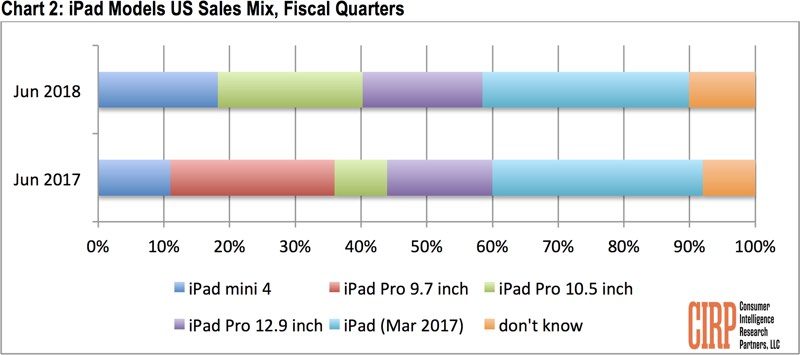
While CIRP's data can provide an interesting look at the iPhones customers in the United States are choosing to purchase, it's worth keeping in mind that CIRP's numbers are aggregated from surveys that encompass just 500 customers who purchased an iPhone, iPad, or Mac during the second quarter of 2018, which spans from April to June.
Source: macrumors









