 NEWS
NEWS
Apple Classifies 2011 Mac Mini as Obsolete
 12/05/2017
 2398
2398
Apple this week added all Mac mini models released in mid 2011 to its public-facing vintage and obsolete products list. 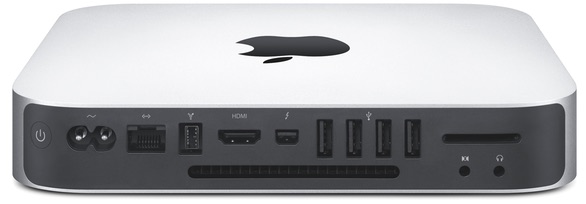
Mid 2011 models have officially been classified as vintage or obsolete as of November 30, 2017, according to an internal memo distributed to Apple Authorized Service Providers and later obtained by MacRumors.
The distinction means that Apple and Apple Authorized Service Providers will no longer repair or service the 2011 Mac mini, given over five years have passed since it was last manufactured, except where required by law.
The only regions exempted include California and Turkey, where customers may still obtain service for up to two additional years.
Apple repairs and services products for up to five years after they are no longer manufactured, and 2011 Mac mini models have now eclipsed that coverage period after being discontinued in late 2012.
2011 Mac mini models were the first with a Thunderbolt port, and the first without an optical disc drive for CDs/DVDs.
It has been over 1,100 days since Apple last refreshed the Mac mini, according to the MacRumors Buyer's Guide. The computer is still powered by Intel's dual-core Haswell processors, now five generations old.
When Apple announced plans for a modular Mac Pro, Apple marketing chief Phil Schiller said the Mac mini "is an important product" in the company's lineup, but he didn't confirm if a new machine is in the works.
Apple CEO Tim Cook likewise said the Mac mini will be an "important part" of Apple's product lineup going forward in a recent email.
Source: macrumors









