
NEWS

Apple Park Visitor Center Set to Open to the Public on November 17

11/09/2017

2881

The Visitor Center at Apple's new Apple Park campus will open to the public on Friday, November 17, according to an internal email that Apple sent out to employees today. 


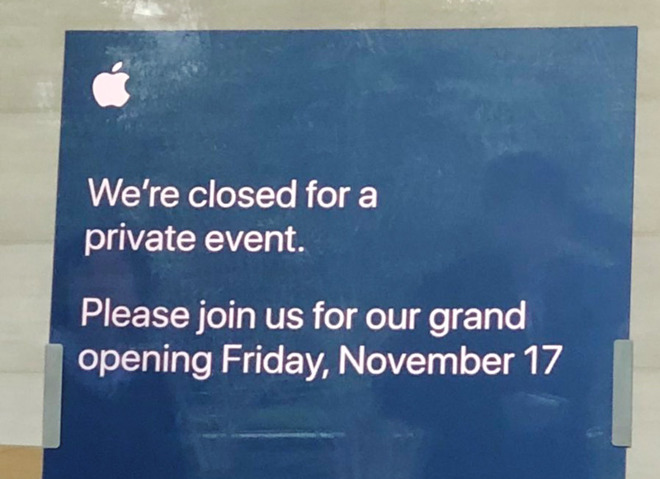
The date is also listed on a sign at Apple Park that was shared today on Twitter, but the sign does not offer up a specific time for the event. 

Apple Park Visitor Center Set to Open to the Public on November 17


According to our source, the Apple Park Visitor Center features a gift shop with Apple-branded items available for purchase, much like the store at One Infinite Loop, but it does not have a full Apple Store and will not stock devices like the iPhone X. 


Prior to the November 17 grand opening, Apple is inviting Cupertino residents who live near the Apple Park campus to preview the Visitor Center on Thursday, November 16. Residents can visit Apple Park from 3:00 p.m. to 8:00 p.m., with a photo ID confirming a nearby address required for entry. 


The Apple Park Visitor Center features a rooftop observation deck that overlooks the main ring-shaped building on the campus, along with a cafe, an outdoor seating area, and indoor wooden tables.


Source: cnet

Windows
Mac OS
iOS
Linux
3uTools
Win 64-bit For this device
V9.0 2025-11-11
Download
Win 32-bit For this device
V9.0 2025-11-11
Download
3uTools
Intel Chip How to Identify Chip Type
V9.0 2025-12-02
Download
Apple Chip
V9.0 2025-12-02
Download
How to Identify Chip Type
1.  Click the Apple icon in the top-left corner of the screen and select About This Mac.
2.  Check the Processor or Chip field to determine if it is "Intel" or "Apple".
Please use the 3uTools PC client to install the iOS client:
1、 Install either the Windows or Mac version of 3uTools on your computer
2、 Open the PC client and connect your device to the computer via USB cable
3、 After the connection is successful, wait for the computer to automatically install the mobile app for the device, or locate “Install Mobile App” on the computer and manually click to install.
3uTools
deb file
V3.01 2025-11-20
Download
rpm file
V3.01 2025-11-20
Download
Windows
Windows
iOS
iOS
Android
Android
TV
TV
3uAirPlayer
Win 64-bit For this device
V6.0.2 2025-11-19
Download
Win 32-bit For this device
V6.0.2 2025-11-19
Download
iOS Device Mirroring (No App Required)
1、 Install 3uAirPlayer on the Windows PC
2、 Open Control Center and select Screen Mirroring
3、 From the list, choose your PC to start mirroring
4、 Or connect your iOS device to the PC via USB to begin mirroring
Scan to get "3uAirPlayer" App
3uAirPlayer TV V1.0.18
2025-11-28
TV System Requirements: Android 7.0 or later
Download the TV installation package, copy it to a USB drive, insert it into your TV or set-top box, then select the file from the home screen to install.




