NEWS

Apple Park Campus Shown Off in New Drone Video, Mystery Stage Included

05/10/2019

4238

Apple Park Campus Shown Off in New Drone Video, Mystery Stage Included


While Apple Park was being constructed, drone pilots like Duncan Sinfield followed Apple's progress on the buildings and landscaping, allowing us to see the campus as work progressed. 

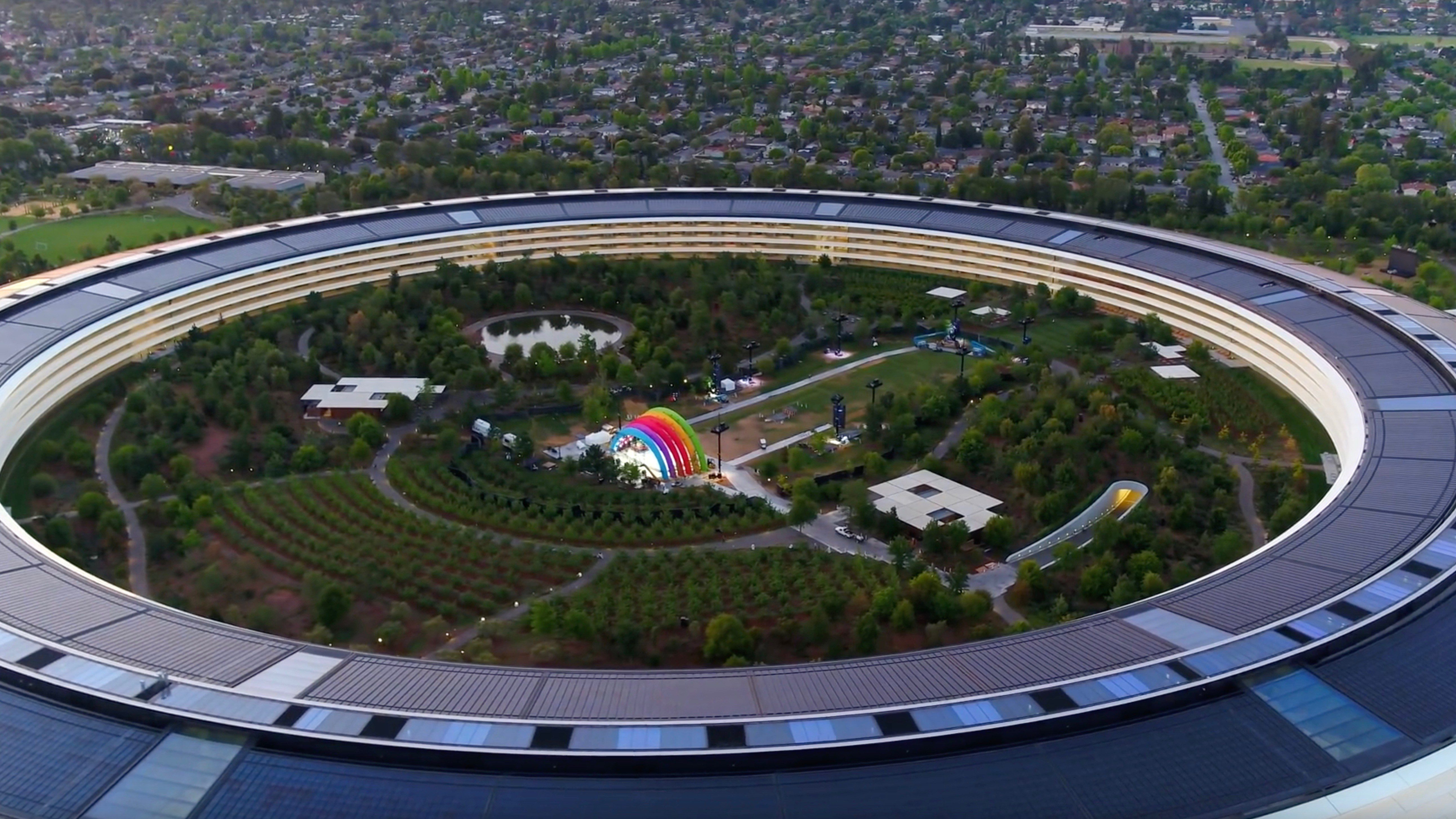
Apple Park has been done for some time now and drone videos have largely stopped, but Duncan Sinfield stopped by Apple Park this morning and captured a great-looking drone video that we thought we'd share with MacRumors readers. 


The main ring-shaped building has all of its completed landscaping, and the video also shows off auxiliary buildings like the Steve Jobs Theater and on-campus parking structures. Hundreds of trees cover the interior and exterior of the ring-shaped building, and there's a large central pond. Everything is looking lush and green thanks to heavy rains in the Bay Area over the course of the last few months. 

Of particular interest is an event stage with a rainbow arch and multiple lights that's located right in the middle of the campus. It's not clear what this is for, but it's likely an upcoming employee-only concert event of some sort, as visitors to the site aren't allowed onto the campus. 

There's no word right now on what the event might be, but Apple often hosts beer bashes and other employee events at Apple Park. The Apple Park Visitor's Center is 
closed on Friday, May 17, so that may be when the event is set to take place.


Source: macrumors

Windows
Mac OS
iOS
Linux
3uTools
Win 64-bit For this device
V9.0 2025-11-11
Download
Win 32-bit For this device
V9.0 2025-11-11
Download
3uTools
Intel Chip How to Identify Chip Type
V9.0 2025-12-02
Download
Apple Chip
V9.0 2025-12-02
Download
How to Identify Chip Type
1.  Click the Apple icon in the top-left corner of the screen and select About This Mac.
2.  Check the Processor or Chip field to determine if it is "Intel" or "Apple".
Please use the 3uTools PC client to install the iOS client:
1、 Install either the Windows or Mac version of 3uTools on your computer
2、 Open the PC client and connect your device to the computer via USB cable
3、 After the connection is successful, wait for the computer to automatically install the mobile app for the device, or locate “Install Mobile App” on the computer and manually click to install.
3uTools
deb file
V3.01 2025-11-20
Download
rpm file
V3.01 2025-11-20
Download
Windows
Windows
iOS
iOS
Android
Android
TV
TV
3uAirPlayer
Win 64-bit For this device
V6.0.2 2025-11-19
Download
Win 32-bit For this device
V6.0.2 2025-11-19
Download
iOS Device Mirroring (No App Required)
1、 Install 3uAirPlayer on the Windows PC
2、 Open Control Center and select Screen Mirroring
3、 From the list, choose your PC to start mirroring
4、 Or connect your iOS device to the PC via USB to begin mirroring
Scan to get "3uAirPlayer" App
3uAirPlayer TV V1.0.18
2025-11-28
TV System Requirements: Android 7.0 or later
Download the TV installation package, copy it to a USB drive, insert it into your TV or set-top box, then select the file from the home screen to install.