
NEWS

Bid on a Lunch With Apple CEO Tim Cook at Apple Park

05/03/2017

3998

Apple CEO Tim Cook is partnering up with Charitybuzz for the fifth year in a row, offering Apple fans the chance to bid on a lunch with Cook where they can hold a discussion with the CEO in a private environment. Additionally, this year the meet-up will be hosted at Apple's brand new Apple Park campus. 


Like previous years, the winning bidder will be able to bring along one other person, and the lunch is said to last for around an hour. The cost of the Apple Park meal is included in the winning bid, but travel and accommodations are not. The bidding ends on May 16 at 3PM EDT and as of writing one bid of $10,000 has been entered, with the auction listing an estimated value of $100,000. 
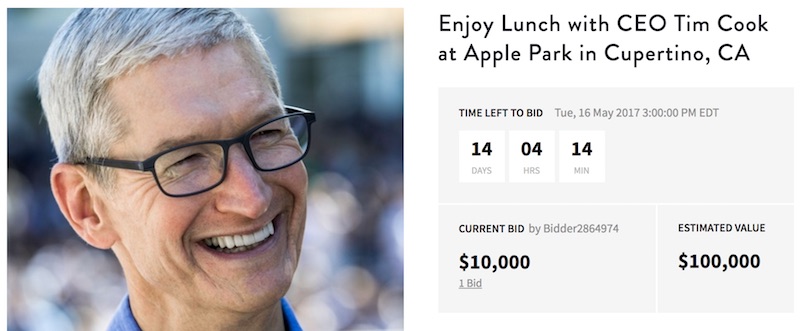

Bid on a Lunch With Apple CEO Tim Cook  at Apple Park


Over the past four years, Tim Cook and Charitybuzz have raised $610,000 (2013), $330,001 (2014), $200,000 (2015), and $515,000 (2016). This year will mark the first year that the winning bidder attends the lunch at Apple Park, which a small number of employees are believed to have moved into in April while construction remains ongoing. 


Proceeds from the auction will be donated to the Robert F. Kennedy Center for Justice and Human Rights, which aims to achieve a just and peaceful world by advancing corporate responsibility, teaching social justice, and partnering with human rights leaders. Cook joined the RFK Center's board of directors last year after being a longtime supporter and proponent of the charity.


Source: macrumors

Windows
Mac OS
iOS
Linux
3uTools
Win 64-bit For this device
V9.0 2025-11-11
Download
Win 32-bit For this device
V9.0 2025-11-11
Download
3uTools
Intel Chip How to Identify Chip Type
V9.0 2025-12-02
Download
Apple Chip
V9.0 2025-12-02
Download
How to Identify Chip Type
1.  Click the Apple icon in the top-left corner of the screen and select About This Mac.
2.  Check the Processor or Chip field to determine if it is "Intel" or "Apple".
Please use the 3uTools PC client to install the iOS client:
1、 Install either the Windows or Mac version of 3uTools on your computer
2、 Open the PC client and connect your device to the computer via USB cable
3、 After the connection is successful, wait for the computer to automatically install the mobile app for the device, or locate “Install Mobile App” on the computer and manually click to install.
3uTools
deb file
V3.01 2025-11-20
Download
rpm file
V3.01 2025-11-20
Download
Windows
Windows
iOS
iOS
Android
Android
TV
TV
3uAirPlayer
Win 64-bit For this device
V6.0.2 2025-11-19
Download
Win 32-bit For this device
V6.0.2 2025-11-19
Download
iOS Device Mirroring (No App Required)
1、 Install 3uAirPlayer on the Windows PC
2、 Open Control Center and select Screen Mirroring
3、 From the list, choose your PC to start mirroring
4、 Or connect your iOS device to the PC via USB to begin mirroring
Scan to get "3uAirPlayer" App
3uAirPlayer TV V1.0.18
2025-11-28
TV System Requirements: Android 7.0 or later
Download the TV installation package, copy it to a USB drive, insert it into your TV or set-top box, then select the file from the home screen to install.




