 NEWS
NEWS
Apple’s Bid to Become A $1 Trillion Company Starts This Week
 10/30/2017
 2653
2653
While people spend more than $1,000 for the right to eventually get an iPhone X (as well as sell that right to eventually get an iPhone X for more than $1,500), we’re seeing Apple is doing a pretty good job of setting the stage as to whether it can make its case to Wall Street that it can be a $1 trillion company.
We’ve noted before that quarterly financial reports from companies are, generally, the moments that consistently swing stock prices for companies. And while Apple is hoarding a ton of cash, its future depends on the success of the iPhone — and, in particular, the iPhone X. While it is rolling out an updated version of the iPhone 7 in the form of the iPhone 8, the iPhone X represents Apple’s interpretation of the true next generation of that slate of glass in your pocket that controls your connection to the rest of the internet.
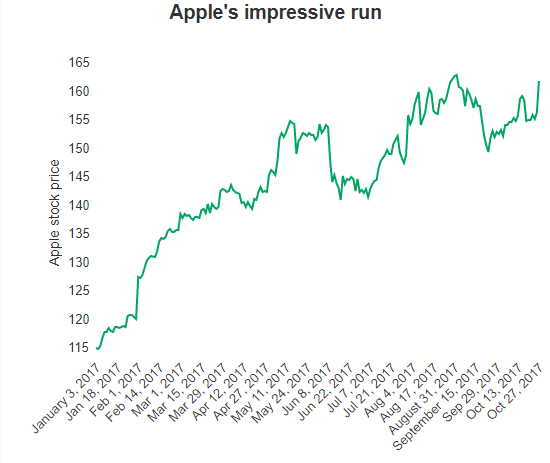
With that in mind, Apple in its last fiscal quarter signaled that it might have a better-than-expected third quarter — something which, again, caused Wall Street to tweak its models and ended up with a pretty significant spike in Apple’s stock price. On the year, it’s been on quite a run, up more than 40%.
In the past year or so, Apple has seen its iPhone growth engine come to a halt. While it isn’t performing poorly by any stretch of the imagination, it has put pressure on the company as it starts to see its revenue level off and temper expectations for Wall Street. It’s launched a portfolio of other devices like the AirPods, as well as some in the hopper like the HomePod, but the story on both of those have yet to play out. It’s also tried to pitch its services business hard to Wall Street as an additional incremental line that’s able to grow methodically sitting on top of its product base.
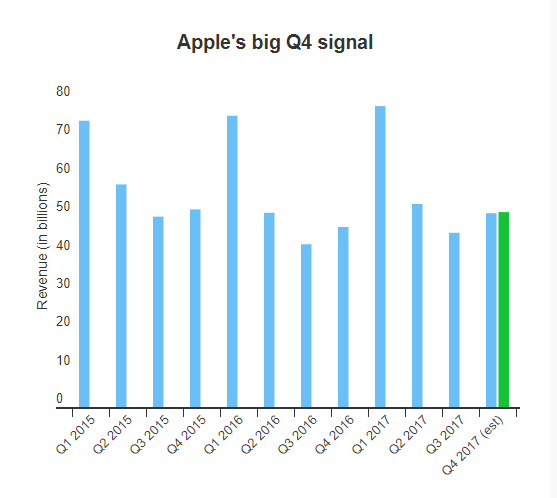
If Apple is going to become a $1 trillion company, that effort is going to begin in earnest tomorrow. Apple has to show that its numbers line up with a trajectory that will send it to that (largely symbolic) number, and the story that CEO Tim Cook tells on the call that accompanies each financial report is going to be just as important. The tea leaves are going to be even more critical as we look for signs as to whether Apple has unlocked a new tier of demand and starts to generate an even greater profit, as well as what the heck it is going to do with all that cash if it actually starts to ramp up a new engine.
Source: techcrunch










