NEWS
NEWS
Steve Jobs' Prototype Apple 1 Computer Going on Display in Seattle's 'Living Computers' Museum
 04/11/2017
 4083
4083
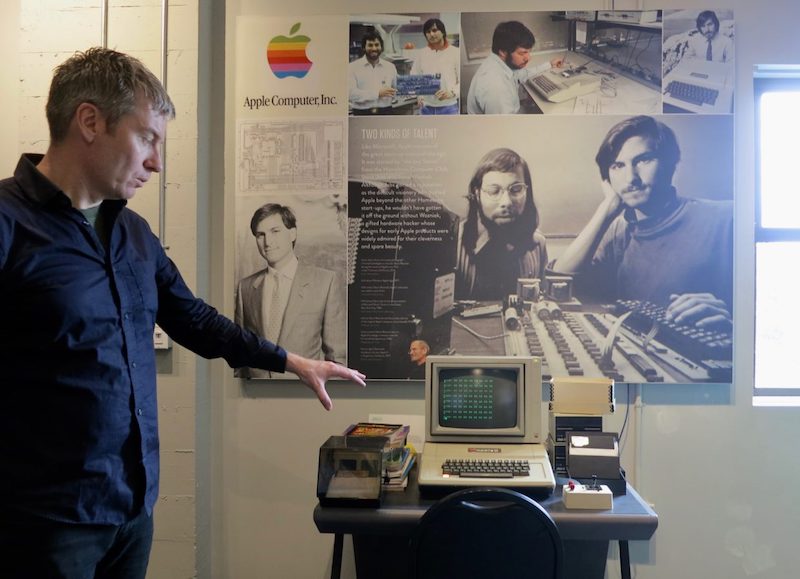
Monday April 10, 2017 5:55 AM PDT by Mitchel Broussard Living Computers: Museum + Labs in Seattle, which is dedicated to showcasing the history of computing devices from around the world, is this Friday opening up a wing focused on all things Apple. Called the "Apple Computer Exhibit," visitors will be able to walk through the first two decades of Apple's products and advances in technology, ranging specifically from 1976 to 1999
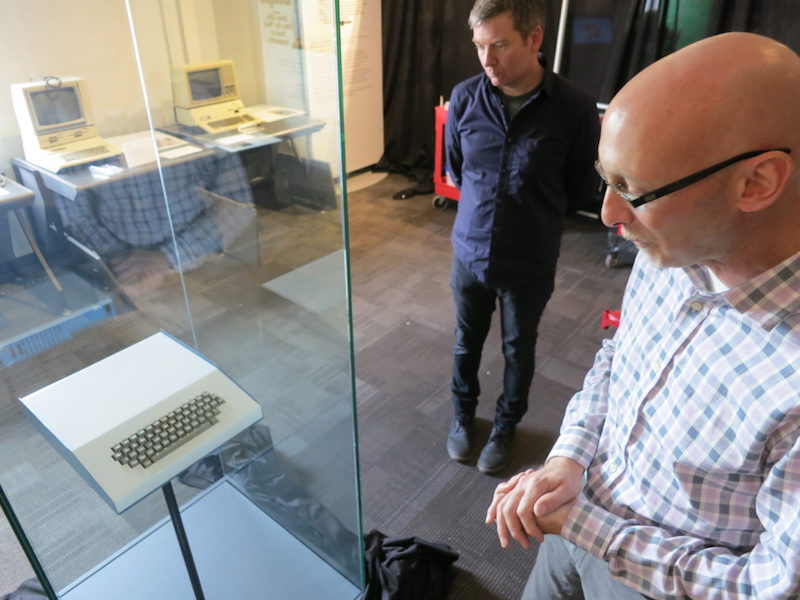
The exhibit will house what Living Computers executive director Lāth
Carlson described as "the most important computer in history," a
prototype Apple I that sat in Steve Jobs' office and was used as a demo
model in the early years of the company. Visitors will be able to
interact with an Apple 1, although it'll be a different version than the
Jobs machine, while also viewing Apple computers like the Apple II,
IIe, IIc, Apple III, Lisa, and various Macintosh computers.
Although Carlson admitted that Jobs' Apple 1 is “also the most boring to
look at," its importance has earned it a spot as the centerpiece of the
new exhibit.
“About 200 of these were made, around 70 are known to have survived, and around seven are operable,” Carlson told GeekWire while showing off the museum’s working 1976 Apple I. “We’re going to be running Steve Wozniak’s version of BASIC that he wrote on it.”
The exhibit includes details about Steve Wozniak and Steve Jobs, the
Homebrew Computer Club in Palo Alto, the original $666.66 price point
for the Apple I, and "much more." A point of focus in the new exhibit is
Apple's early connection with Microsoft, and the museum itself was
founded by Paul Allen, who co-founded Microsoft with Bill Gates.