NEWS

Elevation Lab Has a Gadget that Gives an AirTag a Ten-Year Battery Life

12/19/2024

735

Elevation Lab Has a Gadget that Gives an AirTag a Ten-Year Battery Life


Apple's AirTag is extremely useful when it comes to tracking down lost or stolen items, with many stories detailing how it's helped reclaim personal property. However, while it's small and handy, its battery life can be a problem.


The AirTag uses a CR2032 battery, and that cell lasts for about a year before you need to change it out. While this isn't a massive problem when using it on a keyring, it can be a struggle to regularly replace if it's in a well-hidden and hard to access spot, such as underneath a vehicle.


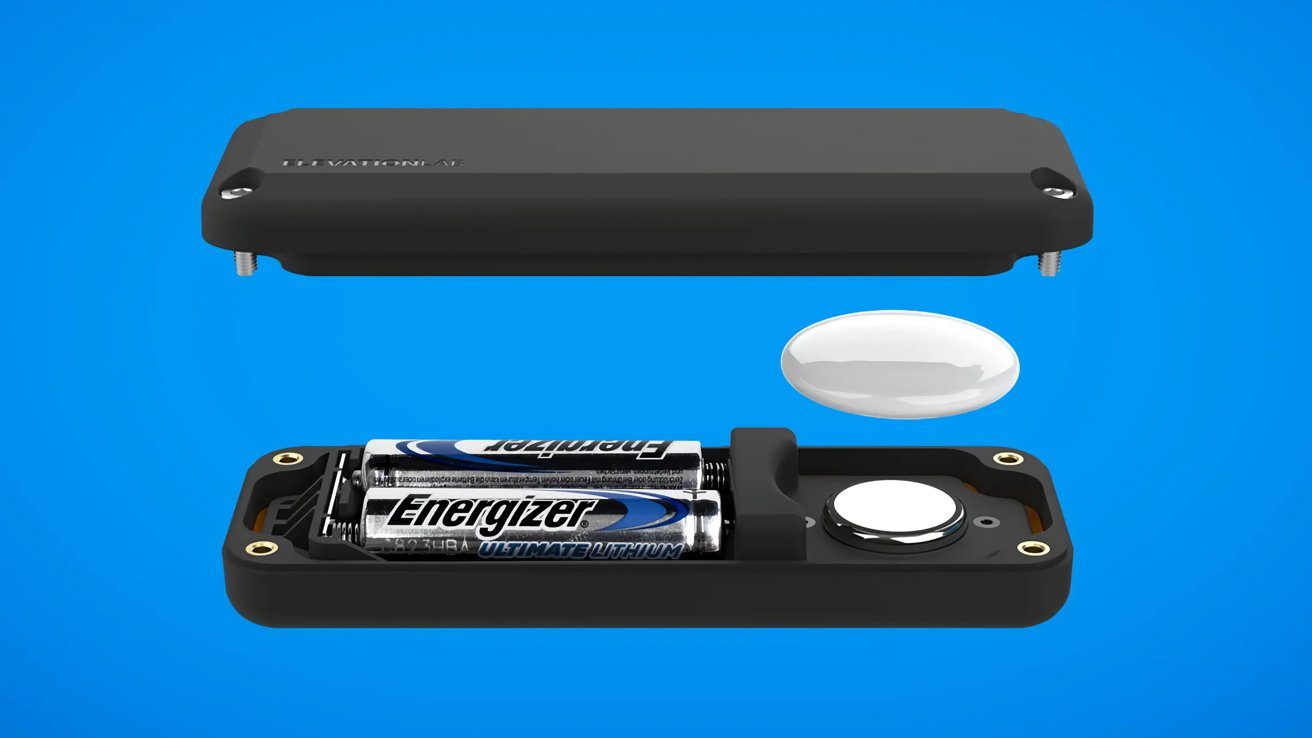
To solve this problem, ElevationLab has come up with the TimeCapsule AirTag Battery Case. A rectangular fiber-reinforced composite enclosure designed to encase the AirTag's main body, and to supply power to it too.


Users have to remove the battery and door from an AirTag before placing it inside the case. Along with the AirTag, the case has space inside its 4.45-inch long, 1.57-inch wide, and 0.75-inch thick casing to hold two AA batteries, which supply power to the AirTag.


The result is a 14-times increase in battery life, with a claimed lifespan of up to ten years. However, this does rely on the batteries being good quality, and not degrading or otherwise failing for such a long period of time.


Using four CNC-machined screws to hold the case together, it's also fully waterproof with an IP69 rating.


TimeCapsule is available now from the company's store and Amazon, starting from $19.99 for one unit. A two-pack is available for $29.99, and a four-pack is $39.99.


Source: AppleInsider

Windows
Mac OS
iOS
Linux
3uTools
Win 64-bit For this device
V9.0 2025-11-11
Download
Win 32-bit For this device
V9.0 2025-11-11
Download
3uTools
Intel Chip How to Identify Chip Type
V9.0 2025-12-02
Download
Apple Silicon
V9.0 2025-12-02
Download
How to Identify Chip Type
1.  Click the Apple icon in the top-left corner of the screen and select About This Mac.
2.  Check the Processor or Chip field to determine if it is "Intel" or "Apple".
Please use the 3uTools PC client to install the iOS client:
1、 Install either the Windows or Mac version of 3uTools on your computer
2、 Open the PC client and connect your device to the computer via USB cable
3、 After the connection is successful, wait for the computer to automatically install the mobile app for the device, or locate “Install Mobile App” on the computer and manually click to install.
3uTools
deb file
V3.01 2025-11-20
Download
rpm file
V3.01 2025-11-20
Download
Windows
Windows
iOS
iOS
Android
Android
TV
TV
3uAirPlayer
Win 64-bit For this device
V6.0.2 2025-11-19
Download
Win 32-bit For this device
V6.0.2 2025-11-19
Download
iOS Device Mirroring (No App Required)
1、 Install 3uAirPlayer on the Windows PC
2、 Open Control Center and select Screen Mirroring
3、 From the list, choose your PC to start mirroring
4、 Or connect your iOS device to the PC via USB to begin mirroring
Scan to get "3uAirPlayer" App
3uAirPlayer TV V1.0.18
2025-11-28
TV System Requirements: Android 7.0 or later
Download the TV installation package, copy it to a USB drive, insert it into your TV or set-top box, then select the file from the home screen to install.