
NEWS

Apple Event on May 7 Has Six Artistic Logos as Tim Cook Hints at New Apple Pencil

04/24/2024

1133

Apple is promoting its upcoming "Let loose" event using six artistic logos amid the expectation that a new Apple Pencil is to be announced.
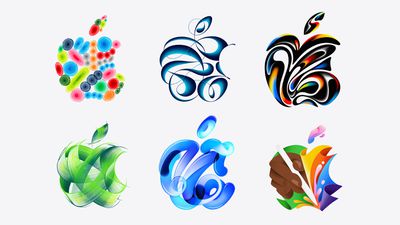
 

Apple Event on May 7 Has Six Artistic Logos as Tim Cook Hints at New Apple Pencil


The six different logos cycle through randomly upon refreshing Apple's homepage. In 2018, Apple promoted its "There's more in the making" event that saw the introduction of the radically redesigned iPad Pro and second-generation Apple Pencil using more than 350 one-of-a-kind Apple logos.


The artistic logos likely allude to the illustration and graphic design capabilities of the iPad Pro and ‌Apple Pencil‌, both of which are expected to receive a substantial hardware refresh at the event. The main artwork being used to promote the event features the ‌Apple Pencil‌ and Apple CEO Tim Cook today hinted at the importance of the accessory to the event in a new post on X (formerly Twitter):


Two new iPad Air models and a redesigned Magic Keyboard accessory are also expected to be unveiled at the event.


The May 7 Apple event will take place at 7 a.m. Pacific Time (10 a.m. Eastern Time), with a live stream to be available on apple.com and on YouTube. The event invitation did not mention an in-person component, with Apple inviting the media to watch online alongside the general public.


Source: Macrumors

Windows
Mac OS
iOS
Linux
3uTools
Win 64-bit For this device
V9.0 2025-11-11
Download
Win 32-bit For this device
V9.0 2025-11-11
Download
3uTools
Intel Chip How to Identify Chip Type
V9.0 2025-12-02
Download
Apple Silicon
V9.0 2025-12-02
Download
How to Identify Chip Type
1.  Click the Apple icon in the top-left corner of the screen and select About This Mac.
2.  Check the Processor or Chip field to determine if it is "Intel" or "Apple".
Please use the 3uTools PC client to install the iOS client:
1、 Install either the Windows or Mac version of 3uTools on your computer
2、 Open the PC client and connect your device to the computer via USB cable
3、 After the connection is successful, wait for the computer to automatically install the mobile app for the device, or locate “Install Mobile App” on the computer and manually click to install.
3uTools
deb file
V3.01 2025-11-20
Download
rpm file
V3.01 2025-11-20
Download
Windows
Windows
iOS
iOS
Android
Android
TV
TV
3uAirPlayer
Win 64-bit For this device
V6.0.2 2025-11-19
Download
Win 32-bit For this device
V6.0.2 2025-11-19
Download
iOS Device Mirroring (No App Required)
1、 Install 3uAirPlayer on the Windows PC
2、 Open Control Center and select Screen Mirroring
3、 From the list, choose your PC to start mirroring
4、 Or connect your iOS device to the PC via USB to begin mirroring
Scan to get "3uAirPlayer" App
3uAirPlayer TV V1.0.18
2025-11-28
TV System Requirements: Android 7.0 or later
Download the TV installation package, copy it to a USB drive, insert it into your TV or set-top box, then select the file from the home screen to install.




