NEWS

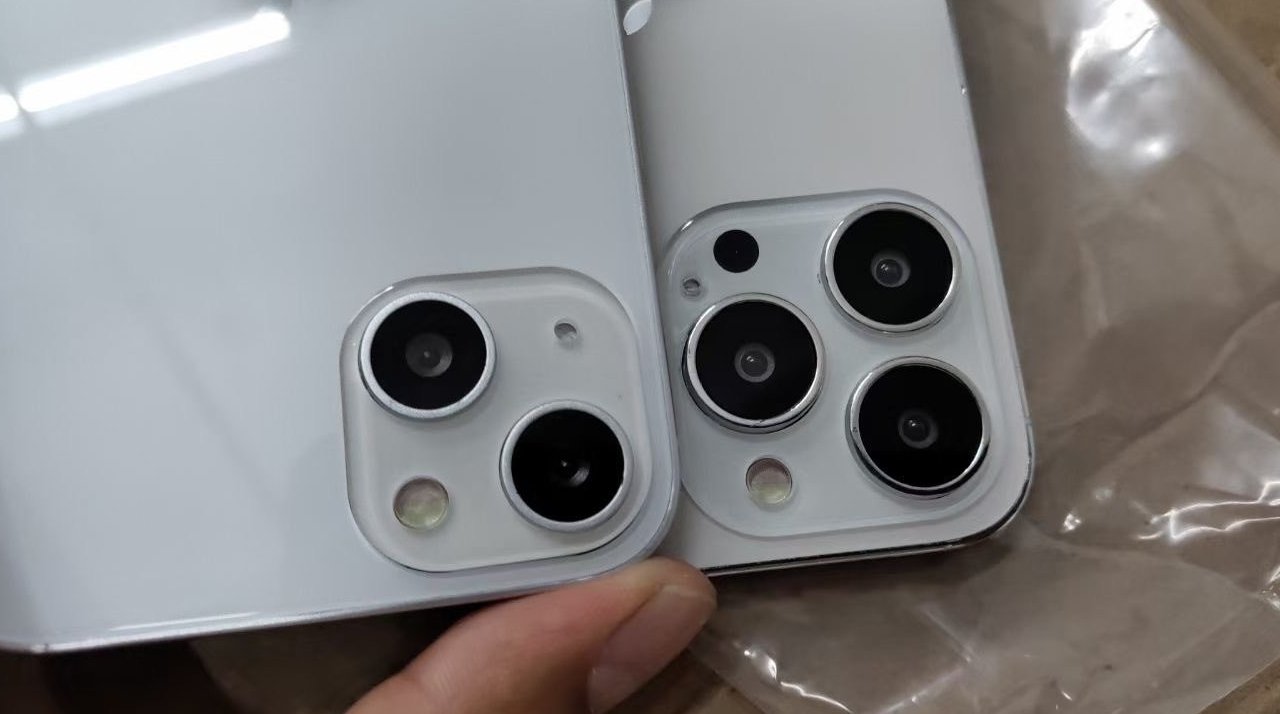
New 'iPhone 13' Mock-ups Show Same-size Notch, Diagonal Camera Orientation

06/30/2021

2332

New 'iPhone 13' Mock-ups Show Same-size Notch, Diagonal Camera Orientation


A new series of dummy "iPhone 13" models have appeared showing a rearranged camera module — but contrary to rumors, the notch is the same size.


Following the recent leak of an image purporting to show four dummy mockups of the next iPhone, a separate new series of images appears to confirm details of a new camera placement.


pic.twitter.com/TpDnx01dTY

— DuanRui (@duanrui1205) June 29, 2021

The new images are from leaker DuanRui, who was recently asked to stop by Apple lawyers. DuanRui has previously been accurate about leaks, including ones regarding case colors.


These latest images appear to show the rear of both "iPhone 13" and the "iPhone 13 Pro." Most significantly, the "iPhone 13" shows that the camera module has been rearranged to position its two lenses diagonally.


Unlike the previous dummy leak, this set of images includes one that shows the front of one of the models. While not clear, it does not appear to match the smaller notch that was shown in a previous 3D-printed dummy.


Source: Appleinsider

Windows
Mac OS
iOS
Linux
3uTools
Win 64-bit For this device
V9.0 2025-11-11
Download
Win 32-bit For this device
V9.0 2025-11-11
Download
3uTools
Intel Chip How to Identify Chip Type
V9.0 2025-12-02
Download
Apple Chip
V9.0 2025-12-02
Download
How to Identify Chip Type
1.  Click the Apple icon in the top-left corner of the screen and select About This Mac.
2.  Check the Processor or Chip field to determine if it is "Intel" or "Apple".
Please use the 3uTools PC client to install the iOS client:
1、 Install either the Windows or Mac version of 3uTools on your computer
2、 Open the PC client and connect your device to the computer via USB cable
3、 After the connection is successful, wait for the computer to automatically install the mobile app for the device, or locate “Install Mobile App” on the computer and manually click to install.
3uTools
deb file
V3.01 2025-11-20
Download
rpm file
V3.01 2025-11-20
Download
Windows
Windows
iOS
iOS
Android
Android
TV
TV
3uAirPlayer
Win 64-bit For this device
V6.0.2 2025-11-19
Download
Win 32-bit For this device
V6.0.2 2025-11-19
Download
iOS Device Mirroring (No App Required)
1、 Install 3uAirPlayer on the Windows PC
2、 Open Control Center and select Screen Mirroring
3、 From the list, choose your PC to start mirroring
4、 Or connect your iOS device to the PC via USB to begin mirroring
Scan to get "3uAirPlayer" App
3uAirPlayer TV V1.0.18
2025-11-28
TV System Requirements: Android 7.0 or later
Download the TV installation package, copy it to a USB drive, insert it into your TV or set-top box, then select the file from the home screen to install.