 NEWS
NEWS
Apple Watch Series 3 Prototype Sports 'Smart Connectors' for Bands
 06/25/2021
 1977
1977
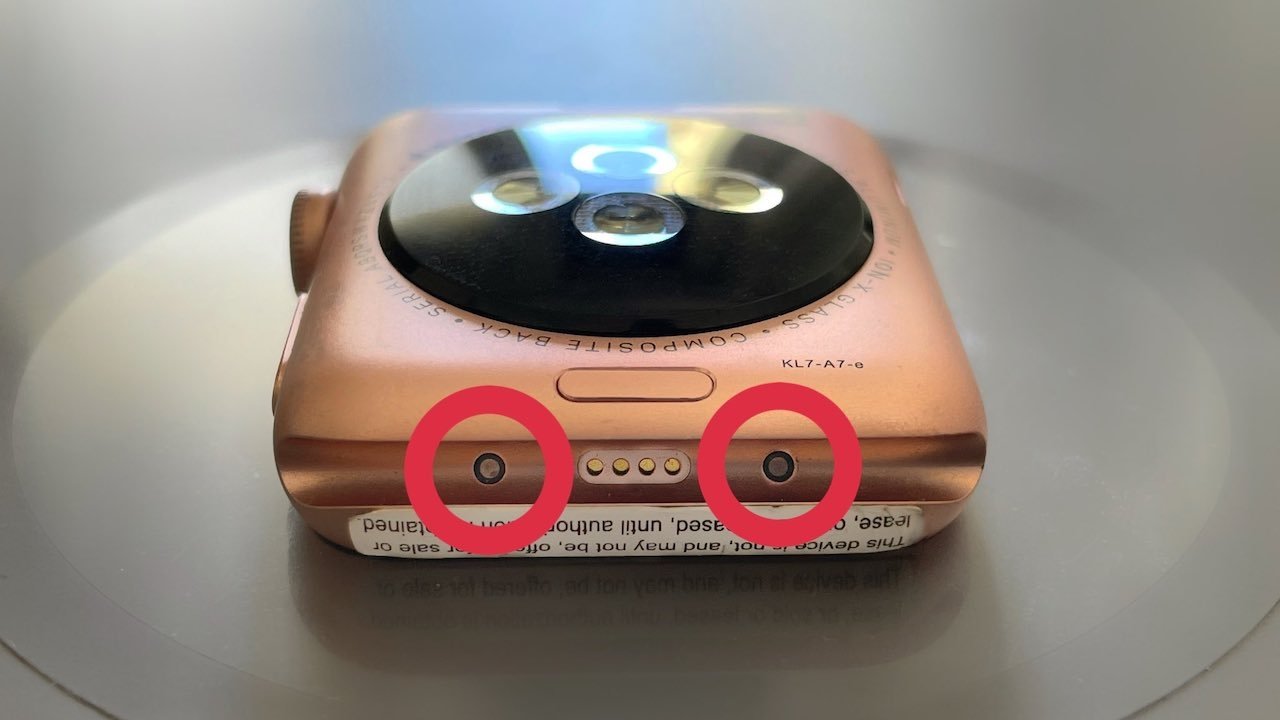
An alleged Apple Watch Series 3 prototype appears to sport some type of smart connector system, hinting at the company's past experimentation with smart bands.
Images of the prototype were posted to Twitter by Giulio Zompetti, who collects rare Apple devices. He suggested that two connection points on it could be some type of "Smart Connector."
Apple might have experimented on some "smart bands" in earlier revisions of Apple Watch S3.
— Giulio Zompetti (@1nsane_dev) June 24, 2021
On this prototype unit, two unusual pads are exposed to the band, as a sort of "Smart Connector" we've already seen on iPads.#AppleCollection #AppleWatch pic.twitter.com/uVFZHuvuAe
Production Apple Watch devices don't have those two unusual pads, which appear similar in design to the Smart Connectors on an iPad.
The prototype wearable has a sticker which warns that the device is not meant for sale. Another thing worth noting is the diagnostic port. Consumer Apple Watch models have a diagnostic port with six pins, and not four.
On its own, the prototype's ports don't confirm that Apple was experimenting with smart band capabilities. However, Apple's work in the area is evident through numerous patent applications filed over the years.
A 2019 patent application, for example, focused on "smart bands" that could be equipped with their own power supply and sensor array. Some type of physical connection point like an iPad's Smart Connector could allow for the smart band to communicate with an Apple Watch.
Apple has also researched modular banks with electrical components disguised as watch strap links, as well as Apple Watch bands that could be self-adjusting.
There have also been rumors of Apple Watch smart bands as far back as 2015. A report from that year, for example, suggested that smart bands with more in-depth sensors could connect via diagnostic port.
The "Apple Watch Series 7," which could see a release later in 2021, is rumored to feature a new design with squared edges, more color options, and improvements to its screen and health sensor capabilities.
Source: Appleinsider









