
NEWS

Apple AirPods Pro 2 SiP Leaks in Two Sizes

12/31/2020

3152

According to past rumors Apple is looking to change up the design of its AirPods Pro successor. The new versions will reportedly feature a more compact round design without the signature stems. Now, a new leak surrounding the next iteration of AirPods Pro is making rounds and it concerns their upgraded system in a package (SiP) enclosures.
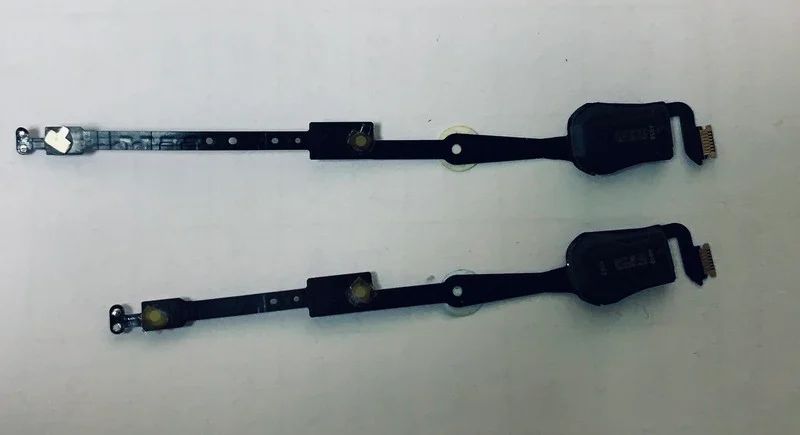

Apple AirPods Pro 2 SiP Leaks in Two Sizes


Alleged AirPods Pro 2 SiP enclosures


We can see two sizes for the housing which iterates that Apple may release smaller and larger versions of its next AirPods Pro. The new leaks suggests the AirPods Pro 2 will still rely on Apple’s H1 chip which boasts Bluetooth 5.0, hands-free "Hey Siri" and lower latency compared to the W1 chip in the first-gen AirPods.


We’re also expecting a new pair of its standard AirPods sporting an in-ear design similar to the more premium AirPods Pro though without their signature active noise cancelation. Apple’s new AirPods are expected to release in the first half of 2021.


Source: Gsmarena

Windows
Mac OS
iOS
Linux
3uTools
Win 64-bit For this device
V9.0 2025-11-11
Download
Win 32-bit For this device
V9.0 2025-11-11
Download
3uTools
Intel Chip How to Identify Chip Type
V9.0 2025-12-02
Download
Apple Chip
V9.0 2025-12-02
Download
How to Identify Chip Type
1.  Click the Apple icon in the top-left corner of the screen and select About This Mac.
2.  Check the Processor or Chip field to determine if it is "Intel" or "Apple".
Please use the 3uTools PC client to install the iOS client:
1、 Install either the Windows or Mac version of 3uTools on your computer
2、 Open the PC client and connect your device to the computer via USB cable
3、 After the connection is successful, wait for the computer to automatically install the mobile app for the device, or locate “Install Mobile App” on the computer and manually click to install.
3uTools
deb file
V3.01 2025-11-20
Download
rpm file
V3.01 2025-11-20
Download
Windows
Windows
iOS
iOS
Android
Android
TV
TV
3uAirPlayer
Win 64-bit For this device
V6.0.2 2025-11-19
Download
Win 32-bit For this device
V6.0.2 2025-11-19
Download
iOS Device Mirroring (No App Required)
1、 Install 3uAirPlayer on the Windows PC
2、 Open Control Center and select Screen Mirroring
3、 From the list, choose your PC to start mirroring
4、 Or connect your iOS device to the PC via USB to begin mirroring
Scan to get "3uAirPlayer" App
3uAirPlayer TV V1.0.18
2025-11-28
TV System Requirements: Android 7.0 or later
Download the TV installation package, copy it to a USB drive, insert it into your TV or set-top box, then select the file from the home screen to install.




