
NEWS

Goldman Sachs CEO Calls Apple Card the 'Most Successful Credit Card Launch Ever'

10/16/2019

2377

The Apple Card was "the most successful credit-card launch ever," according to Goldman Sachs CEO David Solomon (via CNBC). The quote came from a Goldman Sachs conference call held earlier today, in which Solomon discussed the bank's new initiatives with its investors. 
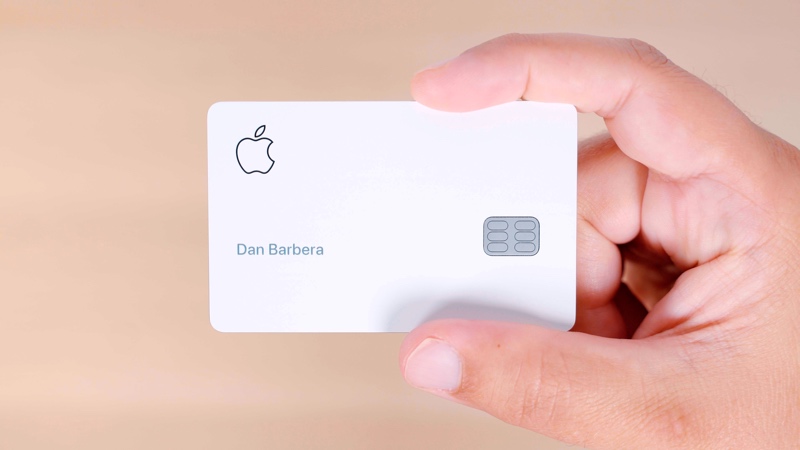
Goldman Sachs CEO Calls Apple Card the 'Most Successful Credit Card Launch Ever'
Apple created the ‌Apple Card‌ in partnership with Goldman Sachs and Mastercard, launching the credit card in August. Solomon stated that since the August launch, the bank has seen a high level of consumer demand for the ‌Apple Card‌. 


“In three short years, we have raised $55 billion in deposits on the Marcus platform, generated $5 billion in loans, and built a new credit-card platform and launched ‌Apple Card‌,” Solomon said, adding “which we believe is the most successful credit-card launch ever.” 


“Since August, we’ve been pleased to see a high level of consumer demand for the product. From an operational and risk perspective, we’ve handled the inflows smoothly and without comprising our credit underwriting standards.”


iPhone owners can sign up for ‌Apple Card‌ right in the Wallet app on iOS, and once they're approved they can begin using the digital version of the card immediately. ‌Apple Card‌ also comes in a physical titanium credit card to be used at places that don't accept Apple Pay.


Source: MacRumors

Windows
Mac OS
iOS
Linux
3uTools
Win 64-bit For this device
V9.01 2025-12-27
Download
Win 32-bit For this device
V9.01 2025-12-27
Download
3uTools
Intel Chip How to Identify Chip Type
V9.0 2025-12-02
Download
Apple Silicon
V9.0 2025-12-02
Download
How to Identify Chip Type
1.  Click the Apple icon in the top-left corner of the screen and select About This Mac.
2.  Check the Processor or Chip field to determine if it is "Intel" or "Apple".
Please use the 3uTools PC client to install the iOS client:
1、 Install either the Windows or Mac version of 3uTools on your computer
2、 Open the PC client and connect your device to the computer via USB cable
3、 After the connection is successful, wait for the computer to automatically install the mobile app for the device, or locate “Install Mobile App” on the computer and manually click to install.
3uTools
deb file
V3.01 2025-11-20
Download
rpm file
V3.01 2025-11-20
Download
Windows
Windows
iOS
iOS
Android
Android
TV
TV
3uAirPlayer
Win 64-bit For this device
V6.0.2 2025-11-19
Download
Win 32-bit For this device
V6.0.2 2025-11-19
Download
iOS Device Mirroring (No App Required)
1、 Install 3uAirPlayer on the Windows PC
2、 Open Control Center and select Screen Mirroring
3、 From the list, choose your PC to start mirroring
4、 Or connect your iOS device to the PC via USB to begin mirroring
Scan to get "3uAirPlayer" App
3uAirPlayer TV V1.0.18
2025-11-28
TV System Requirements: Android 7.0 or later
Download the TV installation package, copy it to a USB drive, insert it into your TV or set-top box, then select the file from the home screen to install.




