NEWS

Apple iOS 13 to Be Released Sept. 19

09/11/2019

2360

Apple iOS 13 to Be Released Sept. 19


Apple iOS 13 will be released on Sept. 19, Apple announced during the company's iPhone 11 event at its Cupertino, California, headquarters on Tuesday. As usual, iOS 13 will be a free software update. You'll be able to download it on the iPhone 6S and all later models. Additional software features will be coming on Sept. 30, with iOS 13.1, according to an Apple press release.


Apple on Tuesday also announced the iPhone 11, 11 Pro, and 11 Pro Max phones, which include upgraded cameras and some lower-than-usual price points, but no major changes in form or function.


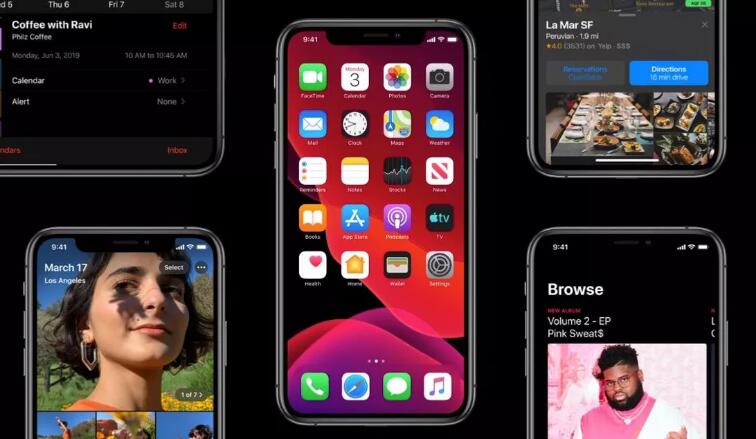
iOS 13 includes new features such as a dark mode and the Sign in With Apple tool, which aims to improve user privacy when creating new accounts on other apps. It also features new camera and video editing tools, such as the ability to adjust portrait lighting. 


Meanwhile, the new iPadOS, announced in June at Apple's WWDC conference, will be available Sept. 30. iPadOS will include all the improvements coming to iOS 13, as well as new features and optimizations specific to the iPad, such as new multitasking abilities and user interface gestures.


In the meantime, you can still join the beta for iOS 13 and test out many of the new features. 


Source: cnet

Windows
Mac OS
iOS
Linux
3uTools
Win 64-bit For this device
V9.0 2025-11-11
Download
Win 32-bit For this device
V9.0 2025-11-11
Download
3uTools
Intel Chip How to Identify Chip Type
V9.0 2025-12-02
Download
Apple Silicon
V9.0 2025-12-02
Download
How to Identify Chip Type
1.  Click the Apple icon in the top-left corner of the screen and select About This Mac.
2.  Check the Processor or Chip field to determine if it is "Intel" or "Apple".
Please use the 3uTools PC client to install the iOS client:
1、 Install either the Windows or Mac version of 3uTools on your computer
2、 Open the PC client and connect your device to the computer via USB cable
3、 After the connection is successful, wait for the computer to automatically install the mobile app for the device, or locate “Install Mobile App” on the computer and manually click to install.
3uTools
deb file
V3.01 2025-11-20
Download
rpm file
V3.01 2025-11-20
Download
Windows
Windows
iOS
iOS
Android
Android
TV
TV
3uAirPlayer
Win 64-bit For this device
V6.0.2 2025-11-19
Download
Win 32-bit For this device
V6.0.2 2025-11-19
Download
iOS Device Mirroring (No App Required)
1、 Install 3uAirPlayer on the Windows PC
2、 Open Control Center and select Screen Mirroring
3、 From the list, choose your PC to start mirroring
4、 Or connect your iOS device to the PC via USB to begin mirroring
Scan to get "3uAirPlayer" App
3uAirPlayer TV V1.0.18
2025-11-28
TV System Requirements: Android 7.0 or later
Download the TV installation package, copy it to a USB drive, insert it into your TV or set-top box, then select the file from the home screen to install.