 NEWS
NEWS
Pwn20wnd Releases Re-written Osiris Jailbreak for Developers and Other Advanced Users
 11/12/2018
 5276
5276
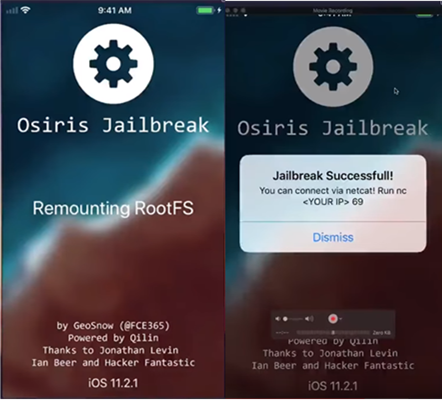
iOS hacker Pwn20wnd was played an instrumental role in various iOS 11-centric projects in recent memory, including the Electra and unc0ver jailbreak tools and the Rollectra un-jailbreaking tool. As of this weekend, however, we can add the Osiris jailbreak tool to that list.
A rewrite of the Osiris Jailbreak from scratch has been done by @Pwn20wnd! Check out the new Osiris Developer Jailbreak. https://t.co/wJyHAK7zo0
— GeoSn0w (@FCE365) November 11, 2018
Pwn20wnd released a rewrite of the Osiris jailbreak tool for iOS 11.0-11.4 beta 3 Sunday afternoon. Osiris uses Ian Beer’s tried and true iOS 11 exploits to achieve a jailbreak on the aforementioned firmware versions, but unlike other jailbreak tools available already, it doesn’t install Cydia.
Osiris is intended as a developer-centric jailbreak tool akin to LiberiOS; it targets users who don’t need or want the Cydia GUI bundled into their jailbreak, such as jailbreak developers, power users, and security researchers. Those who use Osiris would depend solely on command line interfaces, Filza File Manager, SSH, and other means to install files to their pwned handsets.
Despite popular belief, Osiris still supports jailbreak tweak deployment, but they’d need to be installed via the alternative means mentioned above since the Cydia Installer isn’t included in the jailbreak.
If you’re a casual jailbreaker and have already used Electra or unc0ver to achieve a jailbreak on iOS 11.0-11.4 beta 3, then you’re advised to keep your current jailbreak and refrain from switching to Osiris. Only advanced users who know what they are doing should proceed.
For those interested, the re-written Osiris jailbreak for iOS 11.0-11.4 beta 3 is available from Pwn20wnd’s official GitHub repository. The page credits other prominent contributors, including xerub, stek29, GeoSn0w, Ian Beer, and Jonathan Levin for making the work possible.
Source: idb










